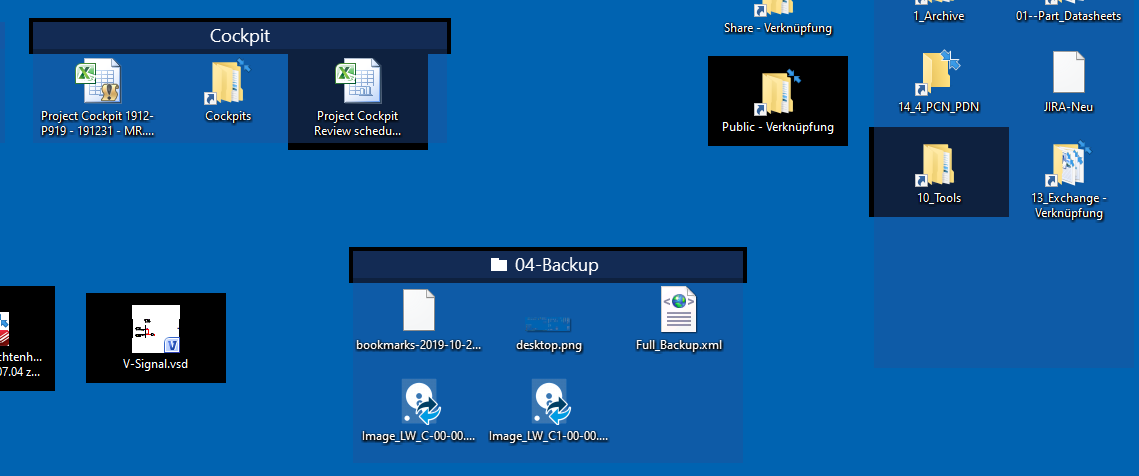
Windows 10 and Fences: Icons suddenly turn black

Windows 10 and Fences: Icons suddenly turn black

Windows 10 and Fences: Icons suddenly turn black when you hover over them.

If you continue working, suddenly the icons change back to their original color when you hover over them.

This has only occurred on Windows 10, on several different PCs even when reinstalling Window 10 and Fences.

With Windows 7, the problem does not occur.

20,862 views 20 replies
Reply #1 Top

Hello,
Sorry to hear you are having issues. Need to know more.

1) Windows 10 version. Please use winver.exe for full version numbers

2) Fences version.

3) Monitor/s setup : Resolution on each, Scaling applied if any, Connection type DVI/DP/VGA/HDMI/USB

Thanks

Basj,
Stardock Community Assistant.

Reply #2 Top

Hi,

1)  different Win 10 versions: 1903, 1909 and also older versions

2)  3.0.9.11

3)  2 Monitors, 1920x1200, scaling 100%, DVI


thank you.

Reply #3 Top

Please try the purge and reinstall steps : https://forums.stardock.com/486084/fences-support-faq#reinstalling

Just to be sure, re-download the latest version from your account. Reboot after the purge. Reinstall it, reboot again. Retest and report back.

Thanks

Basj,
Stardock Community Assistant.

Reply #4 Top

Thank you for feedback.

The problem also occurs in a new installation and not just on one PC.


marox

Reply #6 Top

this is difficult:
since the problem occurs only sporadically (every few days) I would have to constantly work in cleanboot mode ...

Reply #7 Top

a new finding on the problem:
if the problem occurs, the icons in a folder portal are not affected (only the title list from the folder portal)

Reply #8 Top

Please try the following:

-For Win8/10 Users: Open the Start Screen, and type 'cmd'. Right-click on the search result and select 'Run as administrator' from below.

-For 7 Users: click Start, in the start search field type 'cmd'. Right-click on the search result and select 'Run as administrator'.

-Type: sfc /scannow

-Wait for the scan to complete (this can take several minutes)

Some help on how this looks should you need it:

https://support.microsoft.com/en-us/help/929833/use-the-system-file-checker-tool-to-repair-missing-or-corrupted-system

If the SFC finds errors, but cannot fix them, please also run the following command in the same command prompt window:

dism.exe /online /Cleanup-Image /RestoreHealth

Some help on how this looks should you need it:

https://www.windowscentral.com/how-use-dism-command-line-utility-repair-windows-10-image

The above command should assist with replacing any damaged or problematic system files. Please note, however, since it may require restoring certain files, this process can take some time and you will need to be patient until it has completed.

Please let me know whether this resolves your problem or if you have any additional questions.

Thank you,

Basj
Stardock Community Assistant.

Reply #9 Top

Thank you for feedback.

sfc /scannow brings no errors.

For me it is strange that the problem also occurs on a completely different PC with the freshly installed Win 10.

Can it be, that the problem is related to teamviewer?

I installed Nimi Places for testing purposes. Nimi Places windows are not affected when the problem occurs, similar to Fences folder portals. Sometimes the entire screen suddenly turns black (background).

Reply #10 Top

Hello,
I have forwarded your questions/problems to the Stardock Support team for their assistance. Please keep an eye on this thread for any updates. We appreciate you feedback and patience.

Thank You,
Basj
Stardock Community Assistant.

Reply #12 Top

Hello,

Sorry to hear you are having trouble.

Quoting marox11, reply 6

this is difficult:
since the problem occurs only sporadically (every few days) I would have to constantly work in cleanboot mode ...
End of marox11's quote

A clean boot is not the solution, rather, a method to find the cause.  DId you try it - did it work? 

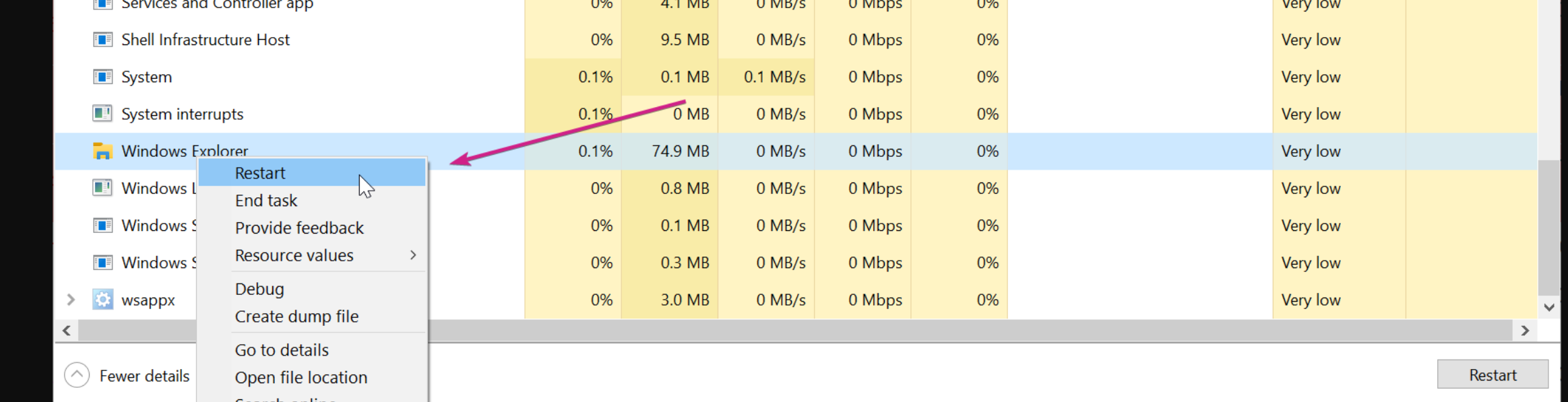
Also, and while not under a clean boot, does restarting Windows Explorer work to solve it?

Sean Drohan
Stardock Support Manager

Reply #13 Top

Hi,

thank you for the feedback.

I have not tried a clean boot.
The problem has not occurred again for 2 days, previously it was daily.

As soon as it appears again I will restart the explorer.

marox11

Reply #14 Top

I am also having this problem. I work around it by opening the Fences config window and adjusting any of the color sliders. Moving one of them resets the icons which have lost their color. Restarting Windows Explorer works as well, but neither of these methods is permanent.

I'm not sure what is causing the problem, but it occurs frequently throughout the day.

Reply #15 Top

Hi there,

Restarting Explorer helps temporarily, but when the problem starts it keeps coming back until the next boot.

I've had the problem forever. The problem occurs on every PC (6 different brands and installations).

It would be nice if there is a solution!

Reply #16 Top

That is strange if the same issue happen on all 6 of your PC. And all 6 PC have Teamviewer on it? Can you just setup one without it and see if it ever happen on that one.

Thank you,

Basj,
Stardock Community Assistant


Reply #17 Top

My current PC has no Teamviewer installed and the problem still occurs.

A little less than the others.

Reply #18 Top

I wonder what is the result from Cleanboot suggested above?

Thank you,

Basj,
Stardock Community Assistant

Reply #19 Top

this is difficult:
since the problem occurs only sporadically (every few days) I would have to constantly work in cleanboot mode ...

Reply #20 Top

Hello,

If Cleanboot mode work, that show something is conflicting with Fences on your Main admin account. You should be able to figure which one of the program is causing it.

Thank you,

Basj,
Stardock Community Assistant