

Stardock Page where I put shortcuts, not the All Programs Fly Up Menu from the Start Button

Hello,  I have Stardock 10 successfully installed on my Desktop win 10 computer.  Just purchased Stardock 10 to install on a new win 10  Dell XPS Laptop.

The problem I am having is that unless I choose Appearance/Show icons as tiles split into: 5 columns, all of the shortcuts do not show as they are all above the top of the screen.  They are not starting out at the bottom and filling towards the top.  This part actually happens to the All Programs page also, but there is enough on that page that I can see the last items like Windows, the end of the alphabet items, way at the top of the page.

So making the setting I mention above works, but I do not want the shortcut icons spread left to right in 5 columns.  I want them in one column like on my desktop.  And this way the page is very wide covering most of my screen.

I made all the same settings on this new installation on the laptop as I have on the desktop but still have this problem.

Hoping someone can help.  I would send a photo but do not see a see a way to a way to attach it to this email.


Thank you,

Tom O'Connor
2,677 views 6 replies
Reply #1 Top

Hello,
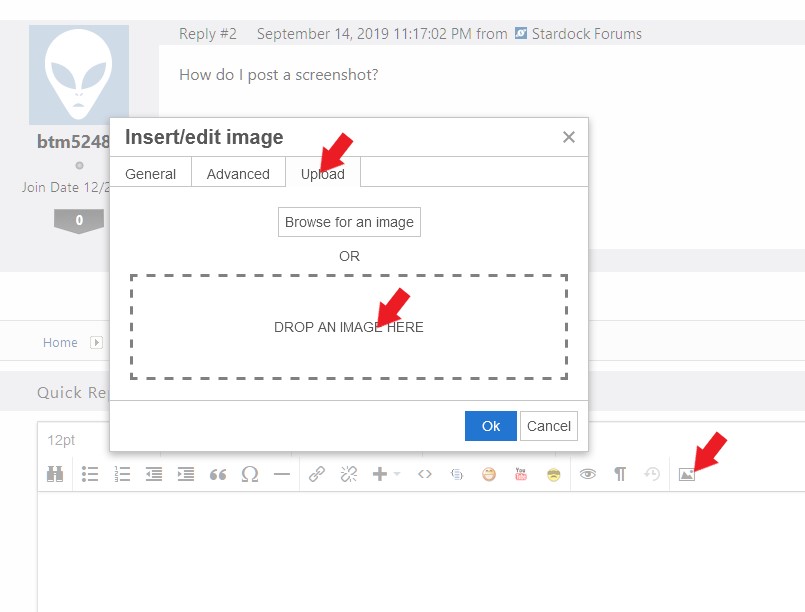
Sorry to hear you are having issues. It will be nice if you can attached a screenshot of your issue. If you can see that frame icon. Than you can click on it and upload the image in this forum.

If you don't have that icons, usually new members do not have that "insert image" icon. Than you can upload the picture to picture sharing site such as imgur and link it here.

Thanks

Basj,
Stardock Community Assistant.

Reply #3 Top

Quoting basj, reply 1

Hello,
Sorry to hear you are having issues. It will be nice if you can attached a screenshot of your issue. If you can see that frame icon. Than you can click on it and upload the image in this forum.


If you don't have that icons, usually new members do not have that "insert image" icon. Than you can upload the picture to picture sharing site such as imgur and link it here.

Thanks

Basj,
Stardock Community Assistant.
End of basj's quote

Sorry Jazlan , but only members with a " 5 " or higher rating have that option

to upload symbol available ... So that won't work for this person.

You can upload a screenshot using image hosting site like the Free one

Imgur Link https://imgur.com/?

OR

ShareX https://getsharex.com/


AzDude
Stardock Community Assistant

Reply #4 Top

Thanks for the screen shot. I believe you need to set the vertical size not to be too high. Please adjust the "Allocate room for at least XX large icons" to something smaller. Refer to the screenshot below.

Thank you,

Basj
Stardock Community Assistant.

Reply #5 Top

Hello, I just figured it out by referring to the settings on my desktop version of Stardock.  Sorry I did not think of that before.  The fix is to un-check the setting in Appearance (Show icons as tiles split into_ columns.  Now the shortcut page is just like the Programs page.


Thanks so much for your help.  I love the software!

Tom