I used Fences for years in W7, and when I first tried installing for W10 there were a lot of problems with Explorer crashing. I just installed Fences 3.0.9.11 to see if there was any improvement and this time around everything works well...almost. The only problem is that occasionally, when I click and drag to create a new fence, nothing happens. At other times it works fine, but it's inconsistent. See what I mean here:


https://gfycat.com/elderlyparallelblesbok 

8,364 views 8 replies
Reply #4 Top

Quoting petersellmer, reply 3

Thank you
End of petersellmer's quote

You are most welcome.

Sean Drohan
Stardock Support Manager

Reply #5 Top

As OP I've been using Fences for years. Though, I just cannot create a new fence. 
Re-installing with admin rights doesn't work for me. 

Though I'm not sure when it stopped working, I've purchased this computer in August and installed Fences and created a couple, now I can't. 

Can it have something to do with the latest Windows Update? 
If I find the correct info I'm on Windows 10 Pro, version 1903, build (I guess) 18362.356 
The only recent update is one for .NET (KB4514359) and a cumulative (KB4515384). 

Reply #6 Top

Quoting stedclar, reply 5

As OP I've been using Fences for years. Though, I just cannot create a new fence.
Re-installing with admin rights doesn't work for me.

Though I'm not sure when it stopped working, I've purchased this computer in August and installed Fences and created a couple, now I can't.

Can it have something to do with the latest Windows Update?
If I find the correct info I'm on Windows 10 Pro, version 1903, build (I guess) 18362.356
The only recent update is one for .NET (KB4514359) and a cumulative (KB4515384).
End of stedclar's quote

Hello,
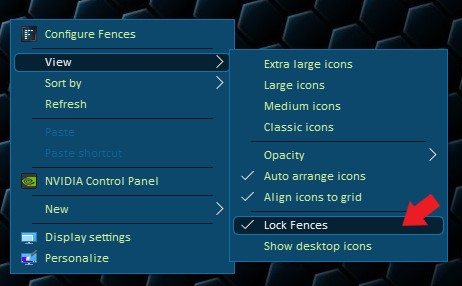
Sorry to hear you are having issues. Please check if you did not accidentally locked your fences. That will stop you from creating new Fences. Right click anywhere on desktop -> View -> Lock Fences

Basj,
Stardock Community Assistant.

Reply #7 Top

Well, this is embarrassing - it was locked. (Didn't barely even know this menu existed.) 

Thank you! 

Reply #8 Top

Great, glad you get it working again.

Thank you,

Basj
Stardock Community Assistant.