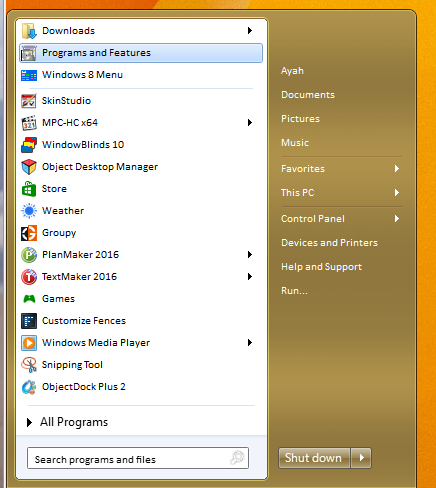
Start8 can't put "programs and features" in start menu

I open control pannel, click on programs and features and drag it to start menu button - toast pops up and says pin to start menu, but it doesn't.

Thanks

EDIT: How do I edit my profile?

How do i add a sig?

Thanks


-------- ThinkPad T530-2394-3J8, i5-3380M 2.9GHz, Win8.1 Pro x64, 8GB(15GB/s), Sammy 250GB SSD. -------.
895 views 2 replies
Reply #1 Top

Hello,
Sorry to hear you are having issues. But, I don't think that is the way to do it. What you should do is.

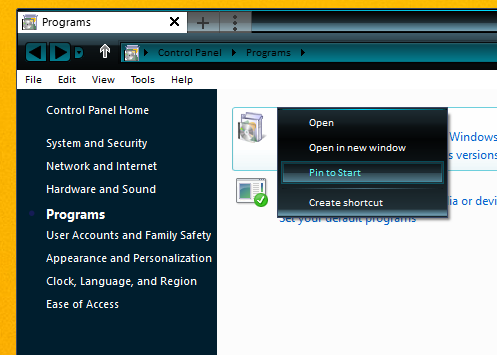
1) Right click on the programs and features -> Pin to Start.

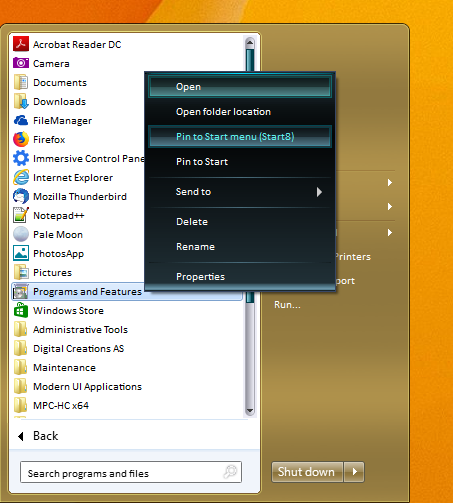
2) This than will make it appear when you click on the "All Program" mode. From there right click again on it. And you will then have the "Pin to Start menu (Start8)" option. Select that and it will appear on the Start8 pinned area (refer s/shot below)

3)

Basj,
Stardock Community Assistant.

Reply #2 Top

Yes, that will do it nicely for programs and features! Thanks!


Now, how  do I edit my profile?  How do i add a sig?

How do I stop it from double spacing?

Thanks

--- ThinkPad T530-2394-3J8, i5-3380M 2.9GHz, Win8.1 Pro x64, 8GB(15GB/s), Sammy 250GB SSD. --