Windows 10 framework64 not found...

Hello,

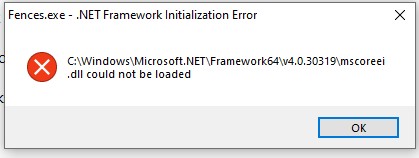
I'm trying to install the latest version of Fences and I have this error right after the installation.

What can I do about it?
Thank you !

JB

9,706 views 9 replies
Reply #1 Top

Hello,
I have forwarded your questions/problems to the Stardock Support team for their assistance. Please keep an eye on this thread for any updates. We appreciate you feedback and patience.

Thank You,
Basj
Stardock Community Assistant.

Reply #2 Top

Hello,

Sorry to hear you are having trouble.

You can install any of the .Net frameworks from here:

https://dotnet.microsoft.com/download/dotnet-framework

That said, you may want to try a Windows Update first.

Sean Drohan
Stardock Support Manager

Reply #3 Top

Thank you for your attention,

I've already done this manipulation....

The updates are ok

And it is not possible:

- to reinstall.net framwork on the latest windows 10

- to uninstall.net framework, it is an integral part of win10.

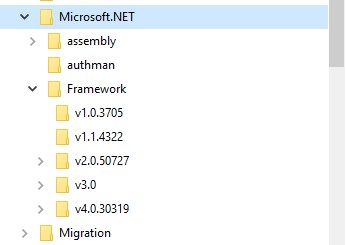
Remarque : The folder \framework64 no longer exists in the latest version of win10, only \framework exists

I don't know what to do anymore....

JB


Reply #4 Top

Quoting jibe49, reply 3

Thank you for your attention,

I've already done this manipulation....

The updates are ok

And it is not possible:

- to reinstall.net framwork on the latest windows 10

- to uninstall.net framework, it is an integral part of win10.

Remarque : The folder \framework64 no longer exists in the latest version of win10, only \framework exists

I don't know what to do anymore....

JB

 
End of jibe49's quote

There is a repair tool:

https://support.microsoft.com/en-us/help/2698555/microsoft-net-framework-repair-tool-is-available

It might also be prudent to temporarily disable your AV app and try installing again.

Sean Drohan
Stardock Support Manager

Reply #5 Top

Quoting jibe49, reply 3

Remarque : The folder \framework64 no longer exists in the latest version of win10, only \framework exists
End of jibe49's quote
Yes, of course that folder still excist. What version of Windows are you on?

Reply #6 Top

re

- repair tool already executed without result

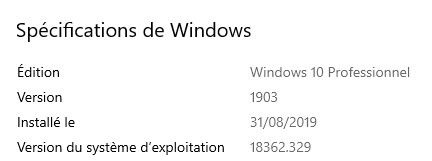
- Version de windows :


- folder 

JB

HI,

I can no longer add an answer....

But I just "fixed windows 10" with the system tool and everything is ok now.

Thanks for the help!

JB

Reply #7 Top

Quoting sdRohan, reply 4

It might also be prudent to temporarily disable your AV app and try installing again.
End of sdRohan's quote

Sean Drohan
Stardock Support Manager

Reply #8 Top

Hi,

I just "fixed windows 10" with the system tool and everything is ok now.

Thanks for the help!

JB

Reply #9 Top

Great, glad you solved it.

Thank you,

Basj
Stardock Community Assistant.