Lose OS when running .bat file

Purging and Re-installing

https://forums.stardock.com/486022/start10-support-faq#reinstalling

Under a previous post, Purging and Re-installing, if you're having trouble getting the app to work, the following file is to be downloaded and run as administrator: http://sd.stardock.com/zubaz/apps/Purge_StartALL.bat. So, I did this, and, lo and behold, no more WIN10 on my VM Paralells. Had to restore a Snapshot to get my OS back. Something definitely wrong here. So, why not use Window's deinstallation instead?

This is for Sean Drohan's attention.

1,960 views 4 replies
Reply #1 Top

Hello,

I have forwarded your report to the Stardock support team for their review and recommendations.

Please keep an eye on this thread for any updates.

We really do appreciate your feedback, thanks.

AzDude
Stardock Community Assistant

Reply #2 Top

Hello,

Sorry to hear you are having trouble.

So, I did this, and, lo and behold, no more WIN10 on my VM Paralells.
End of quote

I can not imagine any situation where that would occur.  If you are familiar with batch files, you can open it to see all that it does.

Are you certain that Windows Explorer was not not restarted?

Sean Drohan
Stardock Support Manager

Reply #3 Top

That's your answer? No, I'm not familiar with batch files. I'm a very experienced computer user; however, I know nothing about programming or files such as this. Nothing opened afterwards. Just a blank, black screen. You didn't answer why I couldn't use WIN uninstall.

Reply #4 Top

Quoting jeanronan, reply 3

You didn't answer why I couldn't use WIN uninstall.
End of jeanronan's quote

You can, but some do not have it in the Add/remove section (for whatever reason) and the batch file gets around that.  Also, the batch does makes sure ALL of Start10 is removed where the uninstaller keeps some things (settings) in case the client re-installs.

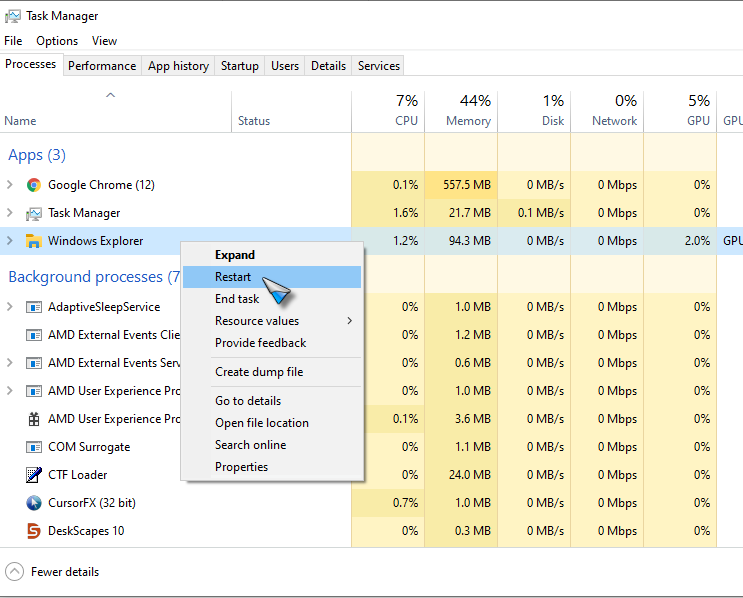
If you just had a 'black screen', it very well could be that Windows Explorer was just not restarted.  To start it again, would would Ctrl + Alt + Del, task manager, then restart it:

Sean Drohan
Stardock Support Manager