Mutiplicity Not Copying & Pasting From 1 Machine

I have four machines synced to Multiplicity, (2 Acers, a Dell and a HP Probook).

Three of the machines allow me to copy and paste between each other with no problems.

The one machine (the HP Probook) allows me to copy and paste from the other 3 machines to tHP ProBook, but I cannot copy from that machine and paste to any of the other 3 machines.

Any idea what's causing this???

Thanks!

13,039 views 20 replies
Reply #1 Top

This would usually be a firewall issue on the HP ProBook as the other machines would connect to it to obtain clipboard data.

Reply #2 Top

Thank you for your response.

I get that it's a firewall issue, so how do I fix it???

I'm not a coder; not an expert with Multiplicity and I have never needed to adjust or touch any firewall settings.

Translated, "I'm in the dark on how to get this working right.

I'm using Windows 1o, if that matters.

Thanks...

Reply #3 Top

Hello,

Sorry to hear you are having trouble.

Any idea what's causing this???
End of quote

Please see:

https://forums.stardock.com/486104/multiplicity-support-faq#cantcopy

Sean Drohan
Stardock Support Manager

Reply #4 Top

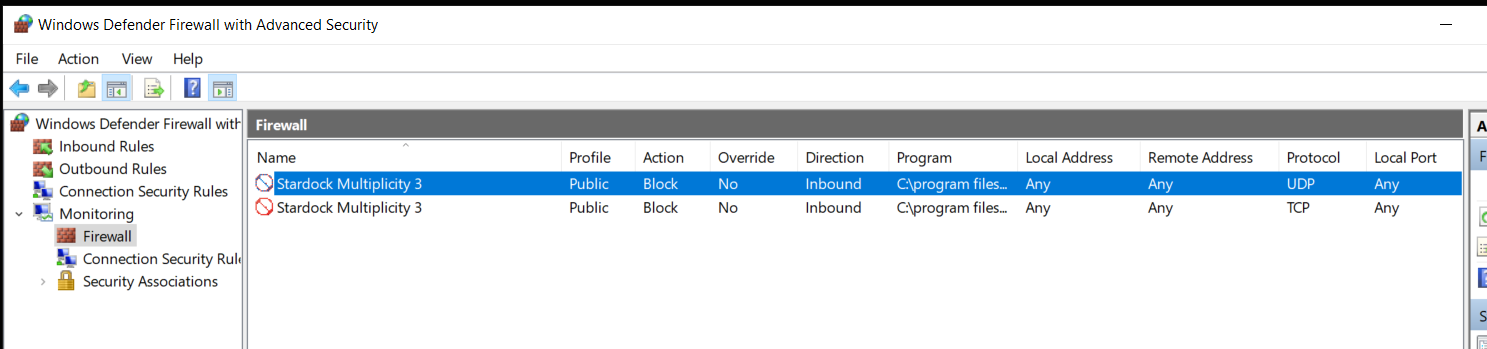
Ok, so after snooping around, I found what's depicted in the attached PIC.

As you can see, the action for Multiplicity is, "Blocked." How do I unblock this?


Thanks

Reply #5 Top

Quoting gillistriplett, reply 4

As you can see, the action for Multiplicity is, "Blocked." How do I unblock this?
End of gillistriplett's quote

You dont, you should not run MP under a 'public' network. What would be a problem (and often the case) is if you configured your network as 'public'.  Make sure that is not the case:

https://www.groovypost.com/howto/change-network-profile-public-private-windows-10/

And if you still have issues, there is what I recommended initially:

https://forums.stardock.com/486104/multiplicity-support-faq#cantcopy

Sean Drohan
Stardock Support Manager


Reply #6 Top

I'm going through the work around... will update shortly.


Reply #7 Top

Quoting gillistriplett, reply 6

How do I switch it to private?
End of gillistriplett's quote

You click the link I provided....

Sean Drohan
Stardock Support Manager

Reply #9 Top

Quoting gillistriplett, reply 8

There seems to be a problem with the file: http://sd.stardock.com/Support/Software/Multiplicity/MPPortFix.zip
End of gillistriplett's quote

Use:

https://cdn.stardock.us/support/uploads/MPPortFix.zip

Sean Drohan
Stardock Support Manager

Reply #10 Top

And how, where.... do I "USE" this file?

Steps please...

Thanks you

Reply #11 Top

Hello, can anyone tell me how to use this file???

I am just installed Multiplicity and ws hit with this issue. I am not a Firewall expert. I have no clue how to use this file, is there anyone who can help???

Thank you,

Reply #12 Top

Hello,

I have forwarded your report to the Stardock support team for their review and recommendations.

Please keep an eye on this thread for any updates.

We really do appreciate your feedback, thanks.

AzDude
Stardock Community Assistant

Reply #13 Top

Quoting gillistriplett, reply 10

And how, where.... do I "USE" this file?

Steps please...
End of gillistriplett's quote

Unzip the file and double click it.  Do so on each MP PC you are working with.

Sean Drohan
Stardock Support Manager

Reply #14 Top

Ok, ran that file on ALL 4 machines, tried it and there were no changes.

I rebooted ALL machines and still no changes.

Any ideas? Next step?


Reply #15 Top

Quoting gillistriplett, reply 14

Any ideas? Next step?
End of gillistriplett's quote

I have never seen that this was not a firewall issue.  To test, didable any and all firewalls on all PCs then try to copy / paste from the problem PC.

Sean Drohan
Stardock Support Manager

Reply #16 Top

You are correct. I did disable the firewall on that machine and once disabled, I can copy from that machine and paste to the other machines.

Reply #17 Top

Hello Sean,

I did disable the Firewall and then went through the tabs, (Domain Profile - Private Profile - Public Profile) as a process of elimination.

The results are as follows.

I can copy and paste from that machine, if:

All tabs are in the "Off" position.

Or, if the "Domain Profile and Private Profile" are "On" and the, "Public Profile" is "Off."

So, by process of elimination, the issue is with the "Public Profile."

My next question is, "How do I fix this?

Thanks!


Reply #18 Top

Quoting gillistriplett, reply 17

So, by process of elimination, the issue is with the "Public Profile."
End of gillistriplett's quote

Make sure the network you are connecting to is not configured as a public one:

https://www.groovypost.com/howto/change-network-profile-public-private-windows-10/

Sean Drohan
Stardock Support Manager


Reply #19 Top

The issue is resolved; that one machine was in fact, configured as a public one. I changed it to private and can now copy and paste from that machine to the others.

Sean, thanks for your help, expertise and patience, !!!

Reply #20 Top

Quoting gillistriplett, reply 19

Sean, thanks for your help, expertise and patience, !!!
End of gillistriplett's quote

You are most welcome - glad you were able to resolve it.

Sean Drohan
Stardock Support Manager