
Increase distance between 2 icons

Hello,


Is it possible to increase the distance between 2 items?
Now the shortcuts name is shorted with …. and auto organised

Or NOT auto placing/organising/snap the shortcut
7,231 views 6 replies
Reply #1 Top

Hello,

Is it possible to increase the distance between 2 items?
End of quote

Please see:

https://mywindowshub.com/how-to-change-desktop-icon-spacing-horizontal-and-vertical-in-windows-10/

Now the shortcuts name is shorted with …. and auto organised
End of quote

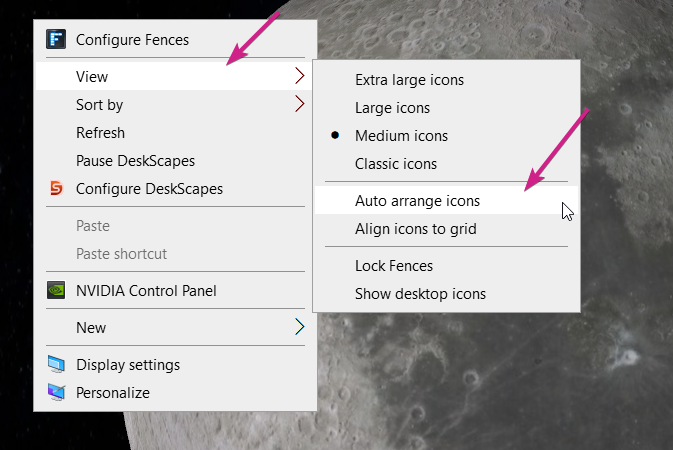
You can set it to not auto-arrange:

Sean Drohan
Stardock Support Manager

Reply #2 Top

Hello,


That doesn't work for me! I already tried.

The Windows icons will stop auto -arange (and can be placed anaywhere) but the items in the Fence still do auto arange and can't be placed wherever I want?!

Reply #3 Top

As far as I know you can't put icons anywhere in the fences, it will always snap, starting from top left and move on to the right of it. and continue to the bottom, when the first row is filled up and so on. You may change how the icons are sorted, but not how the icon is place.

Thank you,

Basj
Stardock Community Assistant.

Reply #4 Top

Hello Basj,


Yes that is what i also see!

But I was hoping there is (or will be) a setting to NOT snap the icons.
Or by holding a function key to override the auto snap?!

Regards,


Reply #5 Top

As it is now, there is no such option available. There were few requests put in by others to include this feature and it were forward to the Support team for their review and recommendation. 

Thanks

Basj,

Stardock Community Assistant.

Reply #6 Top

OK Thanks!

If you have news regarding this i would be plesed to be informed!


Regards,