Program Icons not showing in Start10
top of menu cut off
 Stardock Forums
I used and liked Start8 with Windows 8.
Now with Windows 10 Home 64-bit v. 1809 and Start10 v 1.71 trial, I am having a couple issues that might keep me from buying and using Start10.
On my laptop, whether in Windows 7 style or Modern style, the top of the menu is cut off. In Windows 7 style, the top 3 programs are missing on the 15-inch laptop screen, but show on an extended, larger screen. In Modern style, the user picture is cut off on the laptop screen, but all the program icons are visible. I have turned off "recently used applications" and there is empty space on the program list.
Also, when I click on "All Programs", not all programs show up, notably my MS Office apps. They show up on the pinned list, but not the all program list.
I didn't have either of these problems with Start8 on a 15-inch laptop.
Any suggestions?
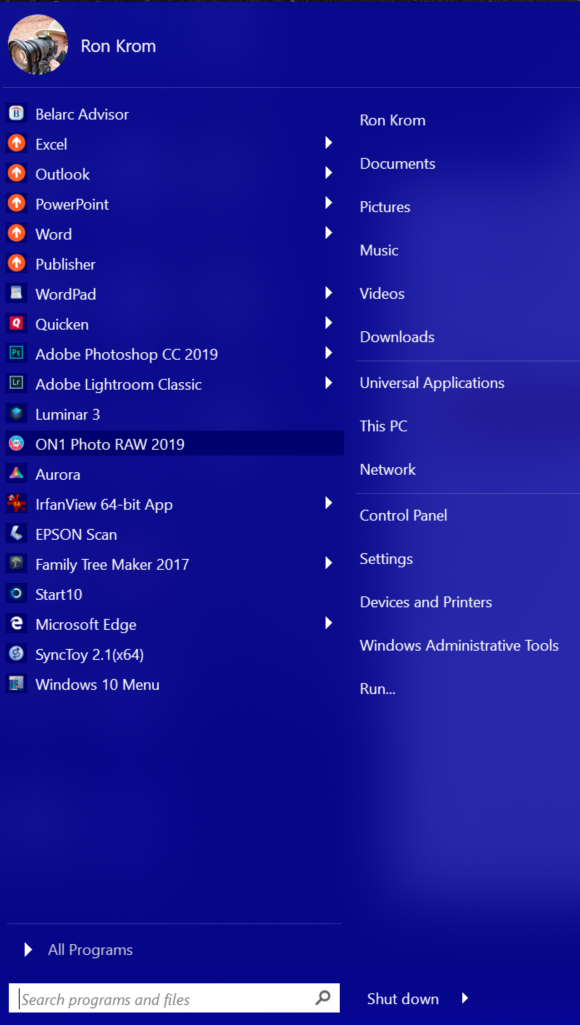
 This is the menu I see on the laptop. Things above PowerPoint are cut off.
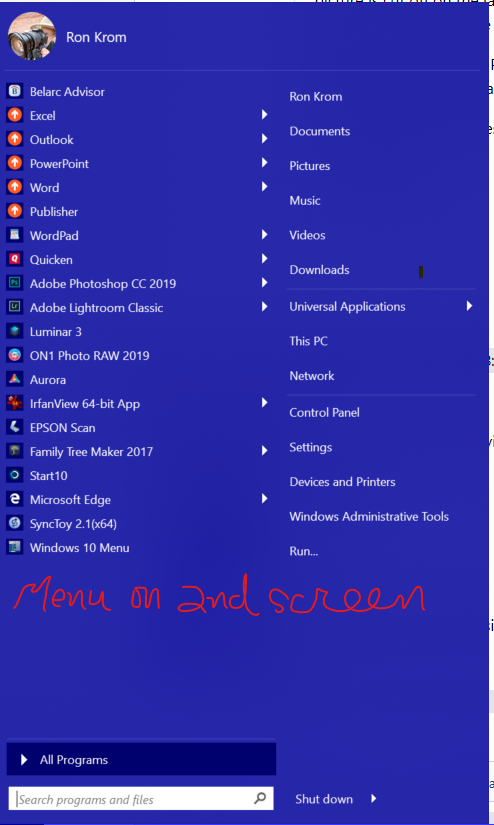 On a second screen, I can see the full Start10 Menu, with all the pinned apps. For some reason, Start10 doesn't scale properly on the laptop screen.