

v.3.0.9 on windows 10 v1903 frozen fences

fences not running in taskman either

After install, the default 3 fences grab the desktop icons and arrange them into the new fences.

I can right click and get a fences settings, etc, but I cannot move a fence or resize or move within a fence to see icons that are outside of the viewable fence borders.

Also, cannot create a new fence.

Lastly, in taskman, fences process is not to be found.

I tried installing as admin.


What else, compatability mode?
7,996 views 4 replies
Reply #1 Top

Hello,

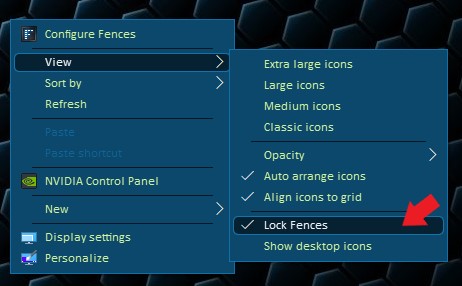
Sorry to hear you are having issues. Please check if fences is not lock. If it is locked, please unlock it. (Right click on desktop-> View-> Lock Fences) and try again.

Basj,

Stardock Community Assistant.

Reply #2 Top

Thanks for the quick response, but, it is not locked.

Reply #3 Top

Please try the purge and reinstall steps : https://forums.stardock.com/486084/fences-support-faq#reinstalling

Just make sure to re-download from your account and reinstall it. Reboot after the installation and test again. Report back here.

Thank you,


Basj,

Stardock Community Assistant

Reply #4 Top

LOL, I just found this as a possible solution.


In the meanwhile I also did the sfc /scannow with zero issues.


I am busy with your suggestion.


UPDATE: I did do the purge, and clean win10 startupwith a new user profile, and still exactly the same issue.

The fences windows are there, I can click icons I can see.

FIRST TIME ONLY,if I hover over the title, then the hamburger menu is there, and resize cursor, but as soon as I action it by actually left clicking, then nothing further happens.


I dont have any funny moving desktops, just a default photo, no sliding anything.


I dont know what to do further.


I can only think it is a windows 10 issue.