
Newly Downloaded Icons Appearing on Second Monitor

Hello. I just upgraded to Windows 10....I know, late to the party. I put Fences on, and the Fences are working just fine. However, whenever I download something onto my desktop or install a new application, the icons and shortcuts go to my second monitor. My primary monitor is landscape, while my secondary is portrait.

I can drag them over and they will stay on the primary monitor, but I like to have my Fences on my secondary monitor and use that screen for all my desktop icons.

Anything I can do to fix this issue? Thank you.
7,438 views 2 replies
Reply #1 Top

Hello,

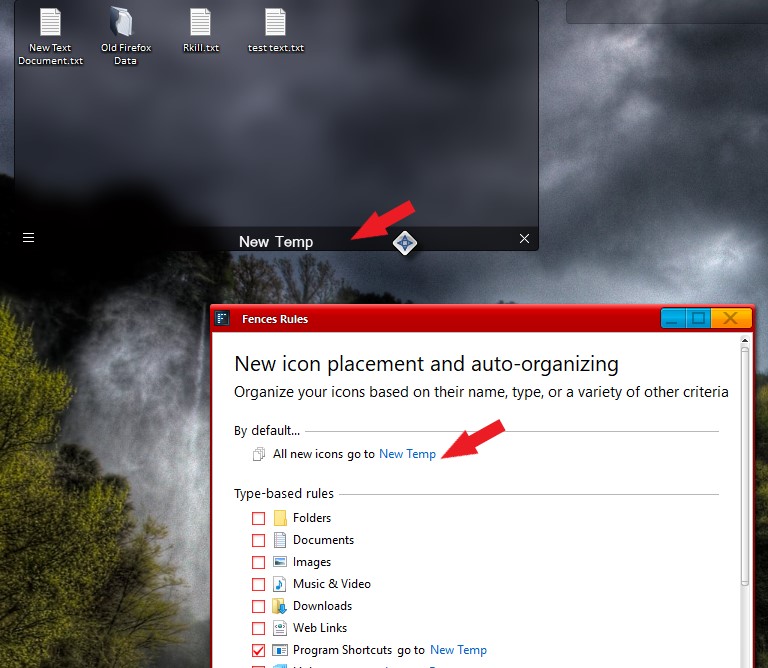
Would like to suggest for you to create a Temporary fences and put it on your primary monitor. Dock it at the bottom or top. And than put a rule to it so that every time a new doc/files get into your desktop will be place into that temporary fences. Than you can always, move to your specify fences or delete it. But you will always know where those doc/files/icon will be. To get to Fences Rules. Click on that 3 bar menu -> Organize -> Manage sorting rules.

Thank you,


Basj,

Stardock Community Assistant

Reply #2 Top

That works, as far as putting it in the fence I created. However, that's not a fix. Is this a bug, or something that is incompatible with Windows 10? I will use this method for now, but I'd like to know if there is a fix in its future.  Thank you for your reply.


My apologies for the late reply back. I didn't realize there was a reply to my question.  Thanks again.