Issues With Pointer/Cursor Icons on Secondary Device

Have two computers and one monitor connected using KVM. OS is windows 10 latest update, keyboard & mouse ea USB wireless type 

Having particular mouse tracking issue on secondary computer.

Each computer has same app installed. In principle mouse (on secondary) follows tracking generally until one starts using graphics type apps (i.e. GIMP, Lightroom) where the mouse pointer changes when specific tool is chosen, to an icon related to the tool.

On the primary computer mouse behaves as expected( icon appears) on the secondary mouse pointer does not change to icon, arrow pointer stays.

8,593 views 10 replies
Reply #1 Top

Hello,Hello,

Sorry to hear you are having issues. Please try these steps https://forums.stardock.com/486104/multiplicity-support-faq#movemousesecondary. I am also forwarding your problem to Stardock Support team for their assistance. Please keep an eye on this thread for any updates. We appreciate your feedback and patience.

Rgds

Basj

Stardock Community Assistant.

Reply #2 Top

I had already researched all the items I found on Stardock forums and one of them was the one you referred me to - thank you.

I am not convinced that you are following my explanation of the issue encountered so will try again.

The Multiplicity configuration works well on both primary & secondary computers with the mouse allowing/following all expected commands. The problem I am having is when using a graphics program (ie adobe lightroom, photoshop, gimp) on the secondary computer when selecting the graphic tool in those programs the mouse pointer should change and show an icon related to the tool selected - it doesn't. On the primary computer with same programs the mouse behaves as expected showing the appropriate icon.

I have tested/tried both a USB wired & wireless mouse and both give same results.

I await a response

Reply #3 Top

Quoting spotmcleod, reply 2

I have tested/tried both a USB wired & wireless mouse and both give same results.
End of spotmcleod's quote

There really isn't anything that MP would do to not render the mouse icon properly.  Can you post a screenshot of what is happening by chance?

----------------
Sean Drohan
Stardock Customer Service Manager 

Reply #4 Top

Sean

Thanks for followup res

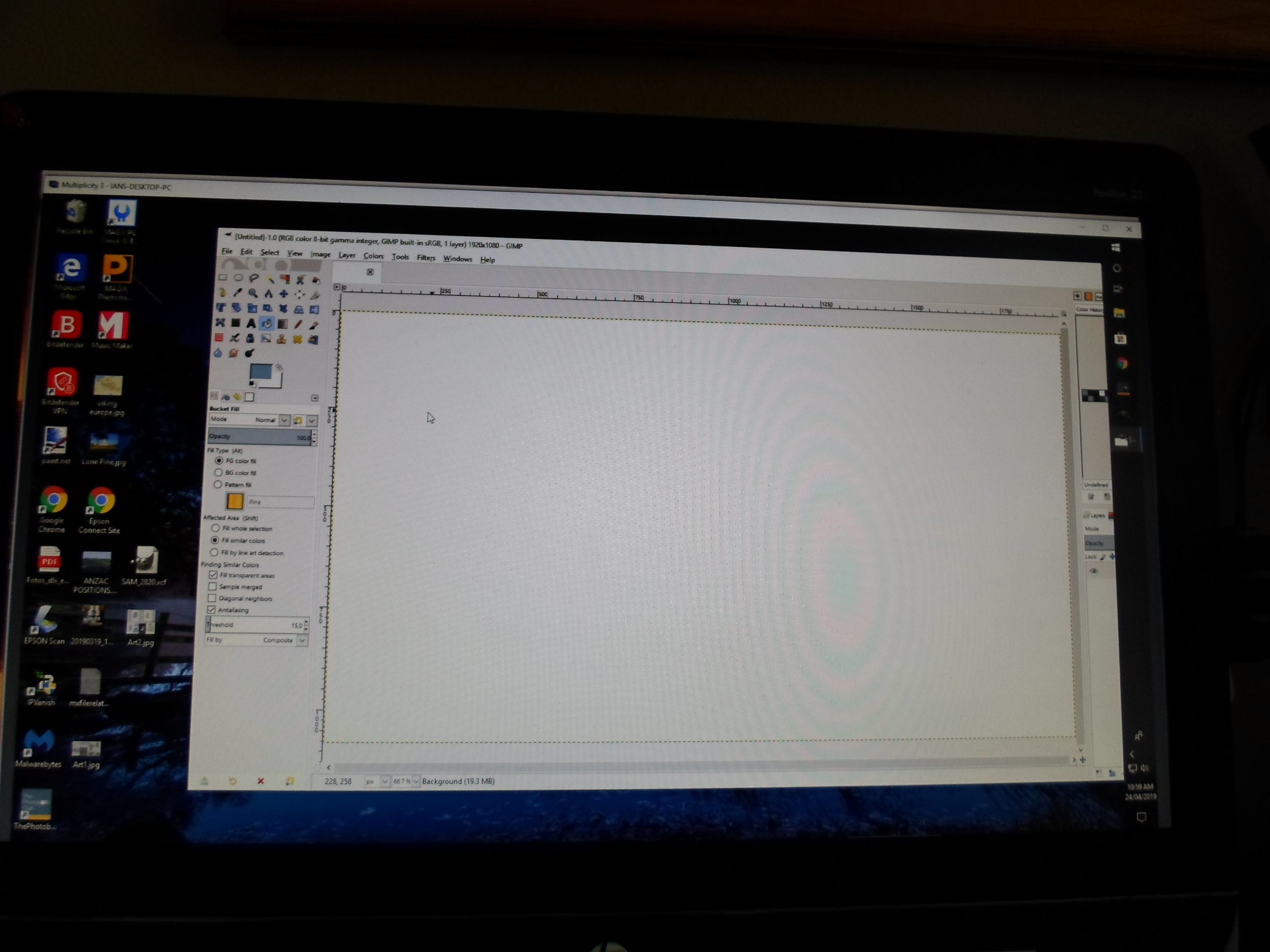
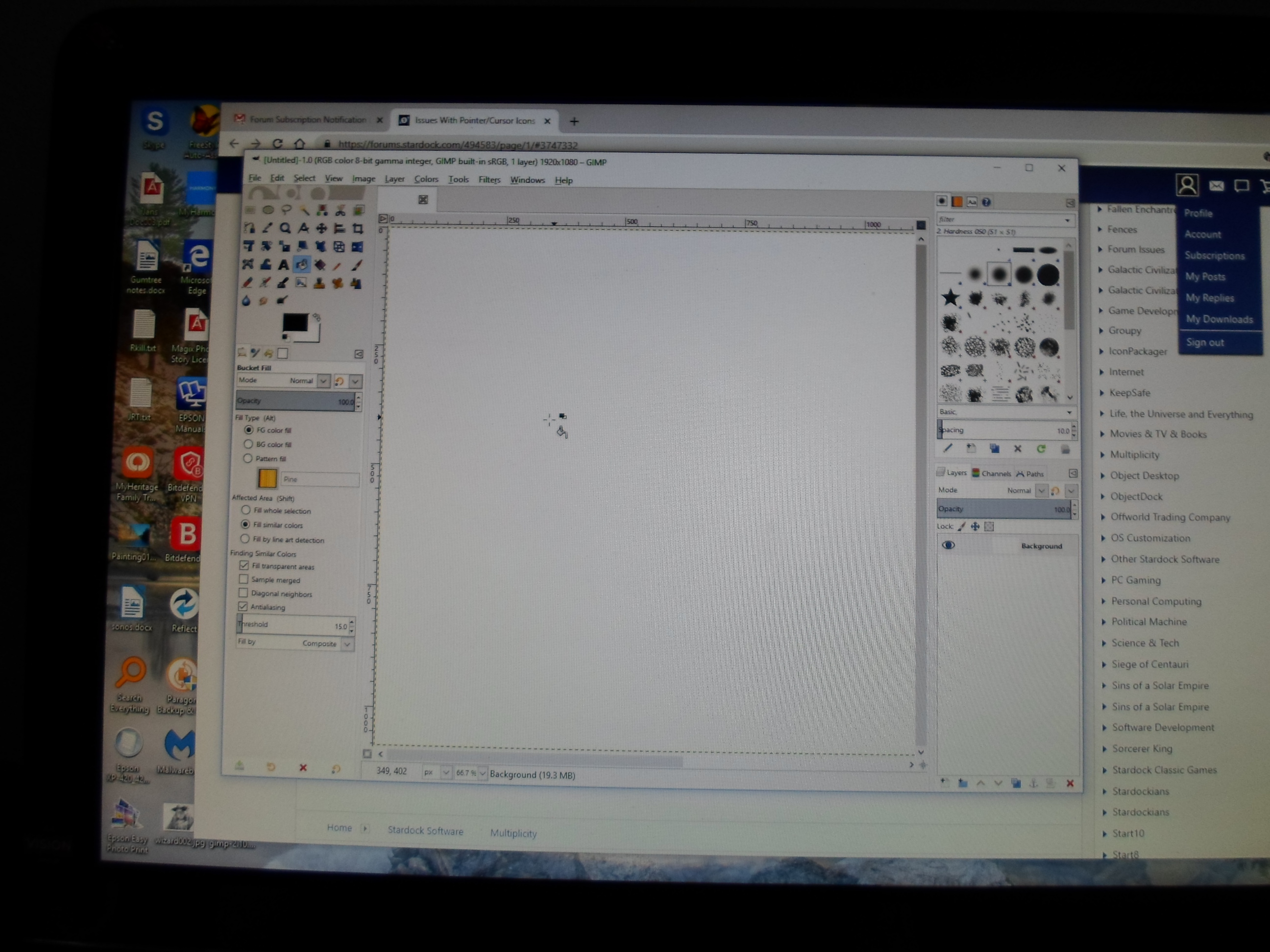
Have posted screen shots here

First shows the primary computer and the correct tool icon for paint bucket tool

Second shows secondary computer same program (GIMP) and same tool selected but the pointer does not change from arrow to associated icon

SCREENSHOT PRIMARY COMPUTERSCREEN SHOT SECONDARY COMPUTER

Reply #5 Top

Sean

Following up on the images posted to you today I have been exploring.

The secondary has no mouse or keyboard connected as normal.

So for an experiment I plugged USB wireless mouse receiver into USB socket on secondary computer leaving mouse switched off and hey presto pointer on the screen begun following expectations. However the only problem then was that the pointer(tool showing) had a shadow trailing slightly behind. Removing introduced usb mouse receiver the pointer reverted to normal action i.e. no trailing but just standard arrow pointer.

It seems to me to be an issue how KVM is managing mouse perhaps and presenting it to the program in use?

Now if I look under preferences of the programs on each platform

The primary shows an active input controller

Where as the secondary shows the"active input controller" grayed out - so not seeing what is expected.

Anyway for what its worth does that help or confuse


Reply #6 Top

OK Sean further experimenting with the trailing mouse pointer seems to related to the USB wireless mouse.

Have plugged usb standard wired mouse into secondary and usb wireless mouse into the primary. On primary no trailing visible when mouse is moved however if the wireless mouse is used on secondary (i.e. via KVM) trailing is visible but if I use the standard wired mouse plugged into the secondary there is no trailing of pointer and change to graphic tool changes as expected. can KVM handle two mice ??


Reply #7 Top

Quoting spotmcleod, reply 6

if I use the standard wired mouse plugged into the secondary there is no trailing of pointer and change to graphic tool changes as expected.
End of spotmcleod's quote

Then that is what you want, yes - on the Secondary - no trail and the pointer shows the proper tool licon, yes?

----------------
Sean Drohan
Stardock Customer Service Manager

Reply #8 Top

Well in short I suppose the answer is yes.

However the expectation when using a KVM tool was that it only required  1 x Keyboard & mouse.

It would have saved a measurable amount of time if it was known that a separate mouse in the secondary device was required at set up !!??

Reply #9 Top

Thank you so much to share your vision. I am also working on an approximately a similiar project. I want to know deep details: Please share a link if you any.

Reply #10 Top

Quoting spotmcleod, reply 8

It would have saved a measurable amount of time if it was known that a separate mouse in the secondary device was required at set up !!??
End of spotmcleod's quote

But that is still true - you only need one keyboard and mouse to control any number of Secondary PCs.  Also, MP is not responsible for your issue - its how Windows itself is telling your app how to render the cursor when it does not see a physical mouse attached.

----------------
Sean Drohan
Stardock Customer Service Manager