Bug /// Multi-monitor setup ignoring shortcut arrow visibility

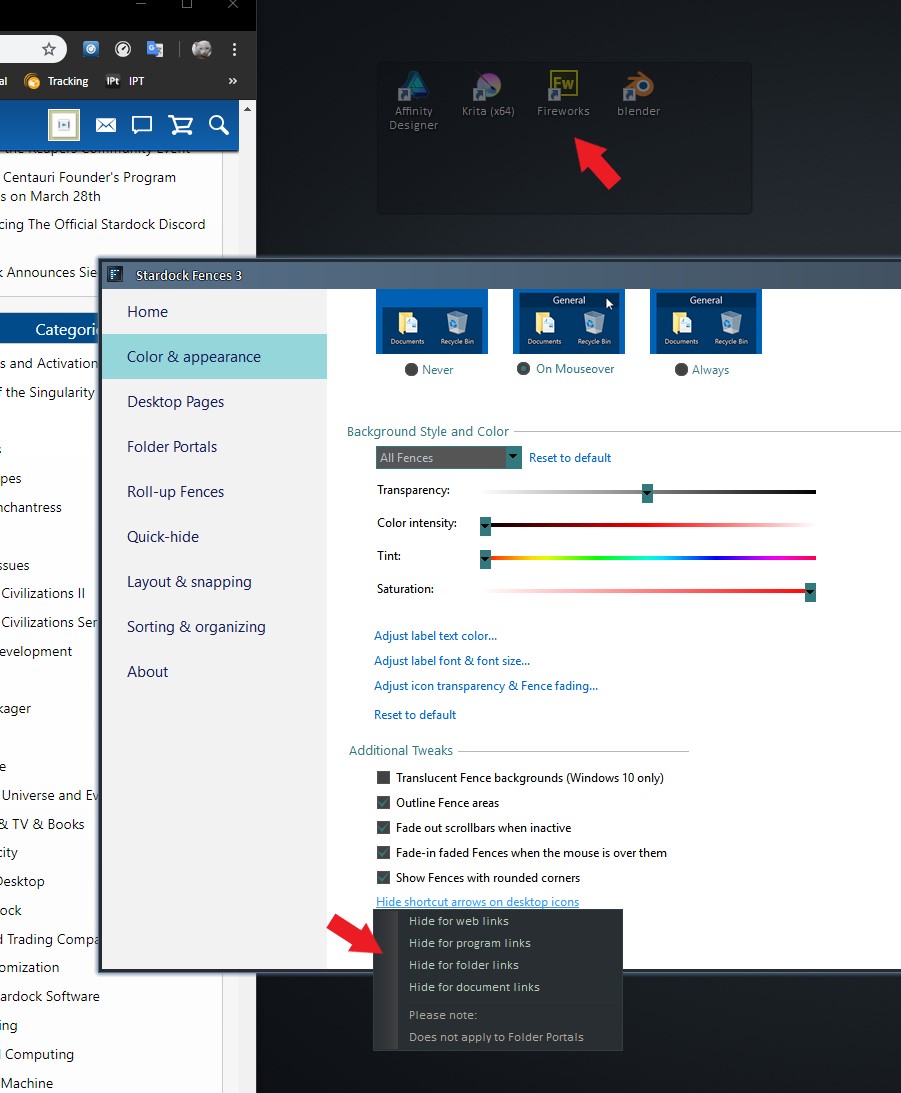
On a multi-monitor computer setup, the visibility of shortcut arrows are ignored. This happens regardless of the shortcut arrows preference chosen within Fences.

Only on the primary monitor is the shortcut arrow preferences always respected. On any other secondary monitor, the shortcut arrows are hidden after a desktop refresh or computer restart.

This can easily be reproduced by populating a Fence with shortcuts on a secondary monitor. Right-click to refresh the desktop and the shortcut arrows will now be hidden. Then drag this particular Fence to the primary monitor and suddenly the shortcut arrows will be visible. This is all done with a normal Fence, not a Folder Portal.

Windows 10 - Build 17134
Fences 3.0.9.11

10,331 views 7 replies
Reply #1 Top

Hello,

I have forwarded your report to the Stardock support team for their review and recommendations.

Please keep an eye on this thread for any updates.

We really do appreciate your feedback, thanks.

AzDude
Stardock Community Assistant

Reply #3 Top

I can't seem to reproduce your issue on my dual monitor setup. When ever I disable "hide shortcut" the shortcut appear. When I do refresh, it still stay visible. Note: the screen shot below is from my secondary monitor.


Please try the purge and reinstall steps mentioned here : https://forums.stardock.com/486084/fences-support-faq#reinstalling

Make sure to re-download the latest version from your account. Install it. Reboot and test it. Report back.


Thank you,

Basj,

Stardock Community Assistant

Reply #4 Top

Thank you for looking into this issue. After purging Fences the shortcut arrows are still not visible on secondary monitors (only the primary monitor), so it seems that this is an issue with Windows. I'll have to look into this some more, which is weird considering it's a totally fresh install of Windows 10.

Reply #5 Top

Please try the cleanboot steps : https://forums.stardock.com/486084/fences-support-faq#cleanboot

it will help to see if there is conflicting applicaitons with fences.

Try it and let us know.

Thank you,


Basj,

Stardock Community Assistant

Reply #6 Top

I performed all of the cleanboot steps under a new Window's Administrator account and the shortcut arrows still remain hidden on secondary monitors.

Although I did uncover something interesting. I went on my coworkers computer (which Fences has never been installed) and the shortcut arrows are hidden on secondary monitors. So it seems like this is a setting built into Windows 10 - Build 17134.

Reply #7 Top

I've eliminated Fences as the culprit to this problem by checking on a different Windows 10 computer which has never had Fences installed.

To reproduce this issue: On a 3 monitor setup, right-click to refresh the desktop and the shortcut arrows will now be hidden on secondary monitors. Drag any shortcut to the primary monitor and suddenly the shortcut arrow will be visible for this individual shortcut.

I've hunted high and low for a solution, but it doesn't seems like an obvious Windows 10 setting that I'm missing. Hard to believe that it's a Windows 10 (Build 17134) bug, but it's possible.