

Hi CPU utilization on Windows 10

https://www.screencast.com/t/lbPVHakEv

Hello, 

I see %25+ CPU utilization of "Multiplicity remote control server" process of my Windows 10 v1803 and when it is at lowest it is around %10-11. Is this expected when connecting to a remote computer in KVM mode or not? Is there a way to decrease CPU utilization? I have the KVM version of the Multiplicity.

https://www.screencast.com/t/lbPVHakEv

P.S: I have submitted a ticket before but it got closed stating that support related issues handled on forum.

6,362 views 6 replies
Reply #1 Top

Hello,

I have forwarded your problem to Stardock Support team for their assistance. Please keep an eye on this thread for any updates. We appreciate your feedback and patience.


Basj

Stardock Community Assistant.

Reply #2 Top

Hello,

Sorry to hear you are having trouble.

https://www.screencast.com/t/lbPVHakEv
End of quote

We do not see the same usage you do:

https://cdn.stardock.us/support/uploads/2019-02-18_11-00-58.mp4

But much is dependant on the resources you have and what content you are viewing via KVM.

Reply #3 Top

Hello,

It seems to display this anomaly after my laptop/desktop get locked. When I log back into my desktop, multiplicity is configured to auto log back into the laptop as well. This is when I see the constant high CPU utilization. There might be a defect. You may want to try reproducing it. If I kill the task and re-connect the process utilizes around %3-4 CPU resources. 


Thanks,

Reply #4 Top

I have experienced the exact same thing.  If the PC that is being controlled by Multiplicity KVM goes to sleep when I walk away from my desk, when I come back and log back in the multiplicity remote control server process shoots up to 90%+ CPU and my laptop locks up entirely.  It is not until after several minutes of wrestling with the 100% CPU issues that I can get into Task Manager ad kill the multiplicity remote control server process and then the CPU utilization drops back down to normal (10% - 20%).  This has to be some kind of bug.  Is there any type of setting in the multiplicity client which might help to prevent this?

Thx.

Reply #5 Top

Quoting kurtstoll, reply 4

If the PC that is being controlled by Multiplicity KVM goes to sleep when I walk away from my desk
End of kurtstoll's quote

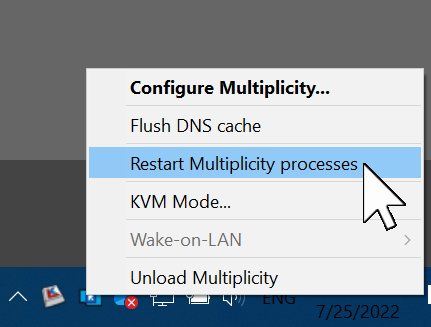
If you restart the MP process when you see this, does it resolve it?

Sean Drohan
Stardock Product Lifecycle Manager

Reply #6 Top

Hi Sean,

Unfortunately not.  The only thing that solves it is when I go into Task Manager and kill the multiplicity remote control server process.

I am open to trying other things, but that is the only thing that works so far.

Rgds,

Kurt