
start button jitterbug

Hi - just installed start10 on dell win10 pc. Sometimes when I hit the start button to proceed it jumps around - I have to hit it a few times for it to stop. Other than that all seems to work fine. Thanks.

3,997 views 11 replies
Reply #2 Top

Hi - it seems to have straightened out - if it acts up again, I will do what you suggest. Thanks.

Reply #3 Top

It started acting up again. When I downloaded the file as you recommended, Malwarebytes stopped it and termed it "exploit payload process". I am now nervous about this - would it be possible to get a refund. If not, I am going to uninstall anyway. Thanks.

Reply #4 Top

Quoting p814n, reply 3

It started acting up again. When I downloaded the file as you recommended, Malwarebytes stopped it and termed it "exploit payload process". I am now nervous about this - would it be possible to get a refund. If not, I am going to uninstall anyway. Thanks.
End of p814n's quote

Hello,

Sorry to hear you are having issues.

Stardock Support is Closed for the Holidays returning Jan.2nd

If problem not better by then ask here again then , please.

Maybe they will have a solution for a fix for you .


AzDude
Stardock Community Assistant

Reply #5 Top

Hi - now have a different issue. The Win10 start up logo now appears where the start10 was after I installed it. I found the application icon in c drive and put it on my taskbar but it doesn't hold. It puts the icon back where the win10 logo appears but on the next boot, the start10 logo is gone again. Where do I find the app for start 10 to install again. Thanks. Hope you had a nice vacation.B)  

Reply #6 Top

Hello,

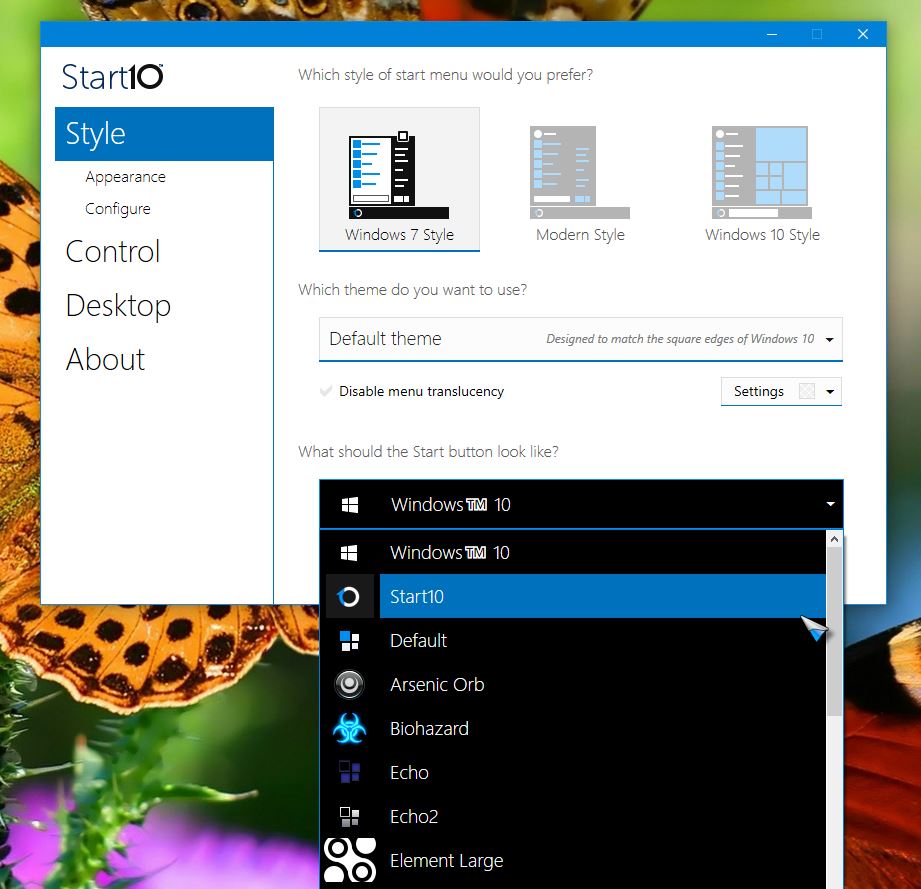
I am assuming you do not have Windowblinds installed in your system. If that so than. You can change your start button by right click on your Start10 menu -> Configure Start10 -> Style -> Press drop down arrow below the "What should the Start button look like?" and just select to Start10 button again.

Thank you,


Basj,

Stardock Community Assistant

Reply #7 Top

So by doing that, it will start up correctly which it hasn't been doing. Thanks. I'll let you know if not.

Reply #8 Top

Did not hold. Upon reboot, win10 start icon on taskbar. Should I download again. Uninstall first and download??

Reply #10 Top

I went to admin acct and jiggered it - seemed to hold on boot to standard acct this time. hope it holds. like it so much better.