Windows 7 unuseable after attempting uninstall of Icon Packager (part of my Object Desktop purchase)

The only solution is to perform a clean reinstall or restore a backup image!

OS: Windows 7 (64-bit)

Software: Object Desktop with all apps installed

Repro steps:

1) Attempt to uninstall Icon Packager (part of my Object Desktop purchase)

2) The Icons become broken (missing icon images) and applications become blank.

Receive error, Windows Explorer has stopped working (Restart the program)

*see screenshot

3) Prompted to reboot system.

4) After reboot, the Windows logon screen is missing the Logon fields (unable to login Windows)

5) Safe mode, system restore does not work, repair does not work.

Result:

Unable to login to Windows.

Workaround:

Clean install Windows or restore a backup Image.

Request:

Proper uninstall instructions.

* No response form support or Sales via email, support ticket system or phone.

Please advise if there is a uninstall tool or process to remove the software.

Please provide a refund.

While attempting to get the screenshot of the uninstall menu, I have broken Windows a 3rd time to post this repro.

I just wanted to see the uninstall menu but it ran the process.

This has been an aweful experience and much downtime.

Please provide asked and a refund.IconPackagerUninstall

8,624 views 14 replies
Reply #1 Top

Hello,

I have forwarded your report to the Stardock support team for their review and recommendations.

Please keep an eye on this thread for any updates.

We really do appreciate your feedback, thanks.


AzDude
Stardock Community Assistant

Reply #2 Top

Hello,

Sorry to hear you are having trouble and that the experience was so poor - it is certainly not typical that we see anything you have reported for IconPackager

Request:

Proper uninstall instructions.
End of quote

While one should set icons to their default state within IP prior to uninstal, and use the traditional uninstall method to proceed, one can use this as well:

http://sd.stardock.com/zubaz/apps/Purge_IconPackager.bat


Please provide asked and a refund.
End of quote

For any refunds, and especially because IP was obtained vie Object Desktop, I would need you to place a ticket here:

https://esupport.stardock.com/index.php?/Tickets/Submit


What I am curious about, however, is this

Clean install Windows or restore a backup Image.
End of quote

Did you try to install / use IP before you restored your backup?  If so, did you experience the same issues?

----------------
Sean Drohan
Stardock Customer Service Manager

Reply #3 Top

Well, to clarify the severity of the issue, Windows will not run any "system related .exe" atm.

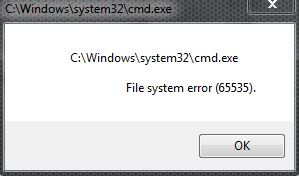
Unable to run the batch since cmd.exe will not run.

Here's a few more screenshots of my system state to better clarify.  (I have not reboot yet, because I will be down a long time to restore a backup image).

I was hoping you could tell me what system files were damaged and how to repair in such a restricted mode.

File system error 65535.

Oddly, Outlook runs.

Tried to run Windows setup to do a repair install and receive this error:

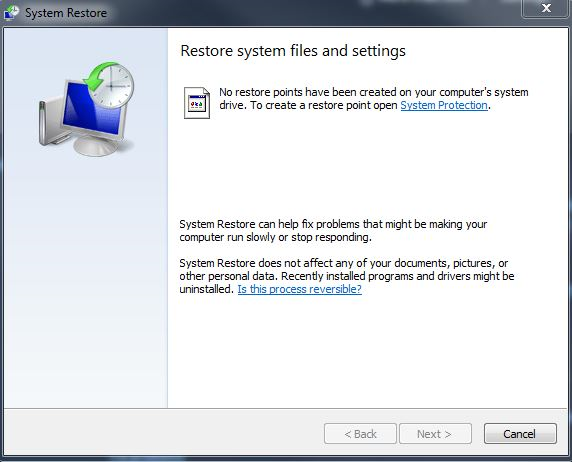
System restore says no restore points have been created, which is incorrect, I had restore points and to prove it, I added a new one after re-imaging the system and get the same error.

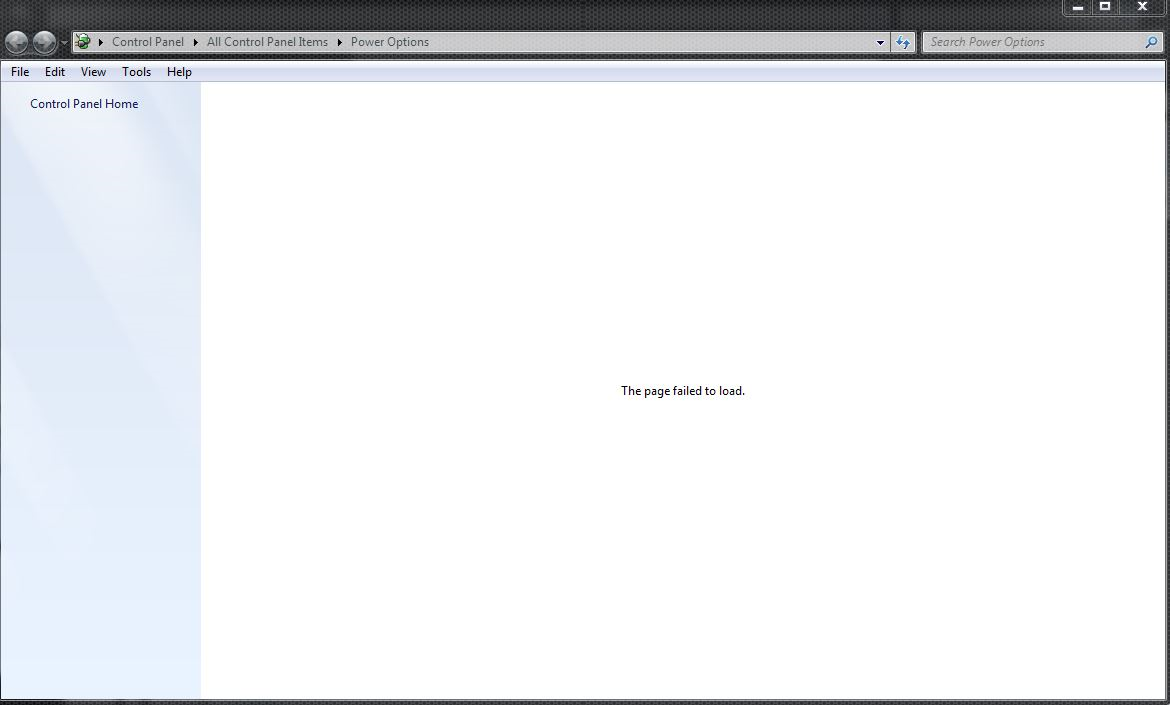
Windows Power Options looks like this:

Ran scandisk (via avg tuneup) and no disk errors (Glary utilities won't run)

Object Desktop Manager runs and shows this:


Reply #4 Top

I am afraid those are corruptions that would be way out of the scope of what I could help with directly nor can I fathom any way any product of our could have caused them - we have never had such a report.

What you should do immediately is run a SFC scan if you can:

https://support.microsoft.com/en-us/help/929833/use-the-system-file-checker-tool-to-repair-missing-or-corrupted-system

----------------
Sean Drohan
Stardock Customer Service Manager


Reply #5 Top

It appears I no longer have administrative account permissions.  I cannot elevate a command prompt nor launch regedit, etc.

What in the Icon Packager uninstall code would alter the User permissions and/or corrupt Windows system files?

My theory on the programs that still run is that they are using Trusted Installer permissions.

Examples of programs that currently still run:

Microsoft Office 2013, AVG PC Tuneup, etc.

Programs that currently don't run:

Glary Utilities, Paragon Hard Disk Manager, Goodsync

Reply #6 Top

Quoting qatestwck, reply 5

What in the Icon Packager uninstall code would alter the User permissions and/or corrupt Windows system files?
End of qatestwck's quote

While nothing is impossible, there has never been a case nor could I conceive of one - there is nothing that IP cares about there or has any actions against. 

Quoting qatestwck, reply 5

Glary Utilities
End of qatestwck's quote

Now that is an app suite that actually does get deep into system files it would seem...

----------------
Sean Drohan
Stardock Customer Service Manager

Reply #7 Top

I thought the screenshots and repros demonstrated the cause.

I've worked in the industry as a QA / SDET for over a decade.

Could you please bounce this one off the dev's and QA's so they can attempt a repro debug the code?

Other people have had some similar issues, here are just a few results:

https://forums.wincustomize.com/426643/programs-dont-work-now-i-get-file-system-error-65535
https://forums.stardock.com/402227/Windowblinds-and-Windows-File-System-Error-65535
https://duckduckgo.com/?q=stardock+iconpackager+uninstall+file+system+error+65535&t=ffab&ia=web

BTW, I never heard a response on how to Safely remove Object Desktop.

Do you make a removal tool?

Please advise.

Reply #8 Top

Quoting qatestwck, reply 7

I thought the screenshots and repros demonstrated the cause.
End of qatestwck's quote

They showcase the symptoms, not the cause.

Quoting qatestwck, reply 7

I've worked in the industry as a QA / SDET for over a decade.
End of qatestwck's quote

Then I appeal to your analytical and observational training / experience.  Regardless of the cause, there is a root system failure here that is not going to be addressed by working on any individual app at this point.

Quoting qatestwck, reply 7

Could you please bounce this one off the dev's and QA's so they can attempt a repro debug the code?
End of qatestwck's quote

Again, at this point, it's not the app we seem to be dealing with.  If you cant run cmd.exe elevated, there is an OS issue, not an app issue.

Quoting qatestwck, reply 7

Other people have had some similar issues, here are just a few results:
End of qatestwck's quote

Quoting qatestwck, reply 7

https://forums.stardock.com/402227/Windowblinds-and-Windows-File-System-Error-65535
End of qatestwck's quote

Was for WindowBlinds, from 2010 and the user never responded to the lead dev for that product.

Quoting qatestwck, reply 7

https://forums.wincustomize.com/426643/programs-dont-work-now-i-get-file-system-error-65535
End of qatestwck's quote

Also for WB and from 2012. The user solved the problem on his own.

His report: 'Seems turning off UAC and my nortons made the problem go away!!! '

Quoting qatestwck, reply 7

https://duckduckgo.com/?q=stardock+iconpackager+uninstall+file+system+error+65535&t=ffab&ia=web
End of qatestwck's quote

A web search of any app is going to showcase individual issues over time.

Quoting qatestwck, reply 7

BTW, I never heard a response on how to Safely remove Object Desktop.
End of qatestwck's quote

Because Object Desktop is not an app on its own, it's a collection of apps - there is no removing Object Desktop, there is only removing the individual apps.

qatestwck, I feel for your plight here, I really do, I just don't know that it was IP that caused it nor do I think focusing on it, as an app, is the right direction at this point. 

----------------
Sean Drohan
Stardock Customer Service Manager

Reply #9 Top

Hi again sdRohan,

I hear yah. =D

I may have confused the situation while holding the repro.

To clarify why I was posting from the broken state (3rd repro)

At the time of the post, I was contacting you from the broken system state and keeping my system in it (before rebooting to where it becomes fully wedged).  Since then, I have restored the backup image and in a Working Windows 7 desktop. Nothing is corrupt until attempting the uninstall.  I can install and uninstall other application without issue.

If I were to attempt the uninstall of Object Desktop, it will most likely break again.

Perhaps I attempted to uninstall the wrong Stardock app first (workflow)?

I noticed many Stardock services and dlls associated with the install Stardock software. Perhaps tthere is a best practice for uninstalling the entire Object Desktop Suite?

ie. instead of uninstalling Icon Packager first ...

ie. You might say shutdown service N first or uninstall WB first or the like

Is there a preferred method?

I appreciate the feedback

Reply #10 Top

Quoting qatestwck, reply 9

ie. instead of uninstalling Icon Packager first ...

ie. You might say shutdown service N first or uninstall WB first or the like

Is there a preferred method?
End of qatestwck's quote

The very first thing I am going to ask you to do is a SFC scan, even if you have a seemingly working system.

After, I would ask that you reinstall IP form your account page:

https://store.stardock.com/myaccount/products

Use it to set your Icons to their default state if they are not, uninstall as you normally would any app from Add / Remove.

----------------
Sean Drohan
Stardock Customer Service Manager


Reply #11 Top

Short version:

imageres.dll is corrupt

Detailed version:

I'm going to note this up front so there is no confusion.

sfc said everything was fine before

Additional note: I had also previously removed some of the StarDock products from Object Desktop I no longer wished to use (I basically tested them all out and kept what I liked).  At this point I did not look for the corrupt files because everything seemed to be working ok (the logon worked).

Given all this I now have a corrupt imageres.dll

Short ver of cbs.log:
Cannot repair member file [l:24{12}]"imageres.dll"

I did a search for Stardock imageres.dll and didn't turn up much, old posts of users in Vista having issues with Logon Studio etc.

https://duckduckgo.com/?q=stardock+imageres.dll&t=ffab&ia=web?

Searching for Win7 and the error in the cbs.log revealed various issues and fixes, I'll await your feedback.


Reply #12 Top

Quoting qatestwck, reply 11

Short version:

imageres.dll is corrupt

End of qatestwck's quote

Try this:

https://www.thewindowsclub.com/rebuild-the-icon-cache-windows

If that fails, while for Win10, see if it translates to Win7:

https://answers.microsoft.com/en-us/windows/forum/windows_10-start/how-to-restore-windows-10-system-icons/38cc12dc-ff7e-4839-99ab-6611118b0cd5

----------------
Sean Drohan
Stardock Customer Service Manager

Reply #13 Top

Yah, I tried that too.  I couldn't even do a repair install of Win7.  At this point I'm going to have to do a clean install.

I was just trying to help weed out any possible application issue by working with you on it.

Thanks for the help.


Reply #14 Top

I repaired the corrupt file and uninstalled all Stardock software.  system runs fine again.