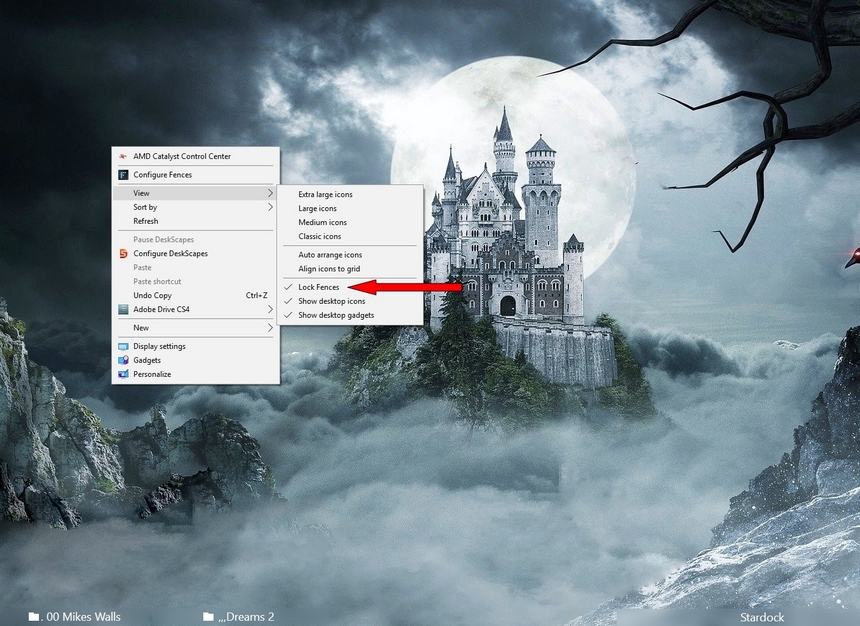
Icons moving from fence

Hello:

I have been using fences for a while now with no issues. I just installed a fresh copy of Fences 3 on a windows 10 pro 64bit Ver 1803. My issue is that randomly, the icons move from the fence to the desktop. I'll start with a nice clean desktop and reboot or log back in and find Icons outside the fences. This is a dual monitor setup. Any ideas?


10,848 views 9 replies
Reply #1 Top

Hello,

Sorry to hear you are having issues. Need more information. You mentioned dual monitor setup. Would like to know what this monitor resolutions. And scaling setting on those monitors.

Thank you.

Basj,

Stardock Community Assistant.

Reply #3 Top

Hello,

Sorry to hear you are having issues.

Are your Fences Locked if unchecked check it .


AzDude
Stardock Community Assistant

Reply #4 Top

Is it only MS Office icons that this happens with?

----------------
Sean Drohan
Stardock Customer Service Manager

Reply #5 Top

I have a similar issue.  It seems to happen arbitrarily but now it happens more often.  I have a two monitor setup and I've tried pushing the icons to the right (secondary) monitor which is arranged in portrait mode while the main monitor on the left is in landscape mode.   Both are at 3840 x 2160 ( or strictly speaking the portrait one is 2160 x 3840).  The fences are locked but often (but not always) when I log out and return the fences move.  It also happens most commonly when I play Age of Empires 3 on Steam and then I log out and log off Win 10 without shutting down. When I log back in the fences are all on the primary monitor now and when I try to restore a snapshot, it keeps the fences in the primary not the secondary monitor as I want them.

This happened before but not too often. Now it's happening more regularly.

Reply #6 Top

Quoting cournot232650, reply 5

I have a similar issue. It seems to happen arbitrarily but now it happens more often. I have a two monitor setup and I've tried pushing the icons to the right (secondary) monitor which is arranged in portrait mode while the main monitor on the left is in landscape mode. Both are at 3840 x 2160 ( or strictly speaking the portrait one is 2160 x 3840). The fences are locked but often (but not always) when I log out and return the fences move. It also happens most commonly when I play Age of Empires 3 on Steam and then I log out and log off Win 10 without shutting down. When I log back in the fences are all on the primary monitor now and when I try to restore a snapshot, it keeps the fences in the primary not the secondary monitor as I want them.

This happened before but not too often. Now it's happening more regularly.
End of cournot232650's quote

Hello,
Sorry to hear you are having issues. On issue about multiple monitors please review these two guides :

1) https://forums.stardock.com/486084/fences-support-faq#shortcutswrongmonitor

2) https://forums.stardock.com/486084/fences-support-faq#multimonitor

Try it and let us know if you still need our assistance.

Thanks
Basj,
Stardock Community Assistant.

Reply #7 Top

Hi. I have been using Fences for a couple of months in a three x 1920 x 1080 monitor setup (Win 10), with all the Fences on a secondary monitor. If  they are not locked by default then I didn't lock them, i.e. they were unlocked. I never had any issue at all. However, yesterday I reinstalled Fences on a new computer (also Windows 10), after the last one passed away :-( and on booting up this morning half of the icons from the six fences were scattered all over the desktop. 

I will now lock the fences and I'll read the guides above to see if there is anything I am doing wrong, but essentially the setup is identical to how it was before. I will monitor and report back any further issues.

Reply #8 Top

Didn't help.  I thought I was OK because I got fed up with issues with my graphics card.  Then I bought a new graphics card which works perfectly now.  But just 2 days after installing the new card, I find the same issue of moving fences.  I just checked regedit and it is set up just as you indicated.  Yet today when I logged out and then back in the fences had moved and backing up to an old snapshot doesnt fix the problem.

Reply #9 Top

Correction.  After restarting, I was able to restore yesterday's snapshot.  But it is annoying that it randomly shifts to the main monitor just from logging out.