ICON arrangement

spaced far apart side by side and up and down

Fences was working fine yesterday 10/30/2018, suddenly the icons became spaced out to where some of them done fit in each fence window.  The Fences options menu doesn't have an adjustment feature for rearranging and spacing the icons.  I have uninstalled and reinstalled but the icons do not return to the close spacing as I had before.  Installed version: 3.0.9.11.

Thanks for your help.

17,945 views 16 replies
Reply #1 Top

Try using your Snapshot to restore


Reply #2 Top

Thanks for your quick response. 

I have my snapshot setting to take daily backup snapshots and there is a shot of the way Fences was configured the way it was before the problem.  However, I don't know how to restore that snapshot to my desktop.  When I click on the snapshot I get the option to "Re-take the snapshot and restore it", or "Just restore it".  I've tried both options, but my desktop remains the same.

Each time I take a snapshot I just get another copy (snapshot) of the desktop the way it is now.

Reply #3 Top

Just double - click on a snapshot and you'll 

have the option to click on restore snapshot 

Reply #4 Top

I've done that numerous times, AzDude.  But the desktop doesn't change.  I even tried the blank desktop snapshot and clicked the restore option.  That did cause my desktop to change, but it showed all my icons with no Fences.  The icons were just scattered throughout the desktop screen.  


Reply #5 Top

Hello,

I have forwarded your report to the Stardock support team for their review and recommendations.

Please keep an eye on this thread for any updates.

We really do appreciate your feedback, thanks.

AzDude
Stardock Community Assistant

Reply #8 Top

Hi, AzDude. 

-Tried the PURGE process but no luck;

- I failed to mention that I have been getting the following messages from my Kaspersky program:

  -"https://t.hanstrackr.com"

  -"Trojan.JS.Miner.m"

  - "Unable to disinfect"

  - Just prior to my Fences problem I was working on something else and got the message that I needed to download and install Acrobat         Reader, which I did. 

I don't know if this is affecting the Fences program but, of course, I need to remove it.  I just sent a support request to Kaspersky.

If you have advice regarding this (Trojan file and Acrobat Reader) I would appreciate it.

Regards

Reply #9 Top

Hello,

I have forwarded your report to the Stardock support team for their review and recommendations.

Please keep an eye on this thread for any updates.

We really do appreciate your feedback, thanks.


AzDude
Stardock Community Assistant

Reply #10 Top


Fences was working fine yesterday 10/30/2018, suddenly the icons became spaced out to where some of them done fit in each fence window.  The Fences options menu doesn't have an adjustment feature for rearranging and spacing the icons.  I have uninstalled and reinstalled but the icons do not return to the close spacing as I had before.  Installed version: 3.0.9.11.

Thanks for your help.
End of quote

You can try holding Ctrl + Middle mouse wheel in / out to resize icons.  Also, you can change the spacing of icons in Windows 10 manually:

https://mywindowshub.com/how-to-change-desktop-icon-spacing-horizontal-and-vertical-in-windows-10/

----------------
Sean Drohan
Stardock Customer Service Manager

Reply #11 Top

Was there any resolution to this?  I'm having the same problem when connected to an external monitor.  I have fences set up so they always stay on my high resolution laptop screen, but it's like the the icon spacing is scaling to the pixel spacing needed if they were being displayed on the lower resolution of the external (Asus USB) monitor.   If i remove the external monitor, the icons readjust to the correct spacing.

Reply #12 Top

Quoting hillbilly63_uk, reply 11

Was there any resolution to this?  I'm having the same problem when connected to an external monitor.  I have fences set up so they always stay on my high resolution laptop screen, but it's like the the icon spacing is scaling to the pixel spacing needed if they were being displayed on the lower resolution of the external (Asus USB) monitor.   If i remove the external monitor, the icons readjust to the correct spacing.
End of hillbilly63_uk's quote

Hello,

Sorry to hear you are having issues. Need more information.

1) Windows version. Use winver.exe for full version number.

2) Fences version.

3) Monitor resolutions laptop screen and external USB monitor. And Scaling applied on both monitors.

Thanks.

Basj,

Stardock Community Assistant.

Reply #13 Top

Hi, basj, thanks for your response.  In reply:

  • Windows 10 Version 1809 OS Build 17763.292
  • Fences version: 3.0.9.11 (trial, 12 days remaining)
  • Laptop monitor (Surface Pro 2017): 2736 x 1824 (Windows setting 'Scale and Layout' set to 175%) 
  • USB Monitor (Asus MB168B+): 1920 x 1080 ((Windows setting 'Scale and Layout' set to 100%) 
  • I have monitors set up so Start bar moves to USB monitor, but Fences stay on laptop monitor.  
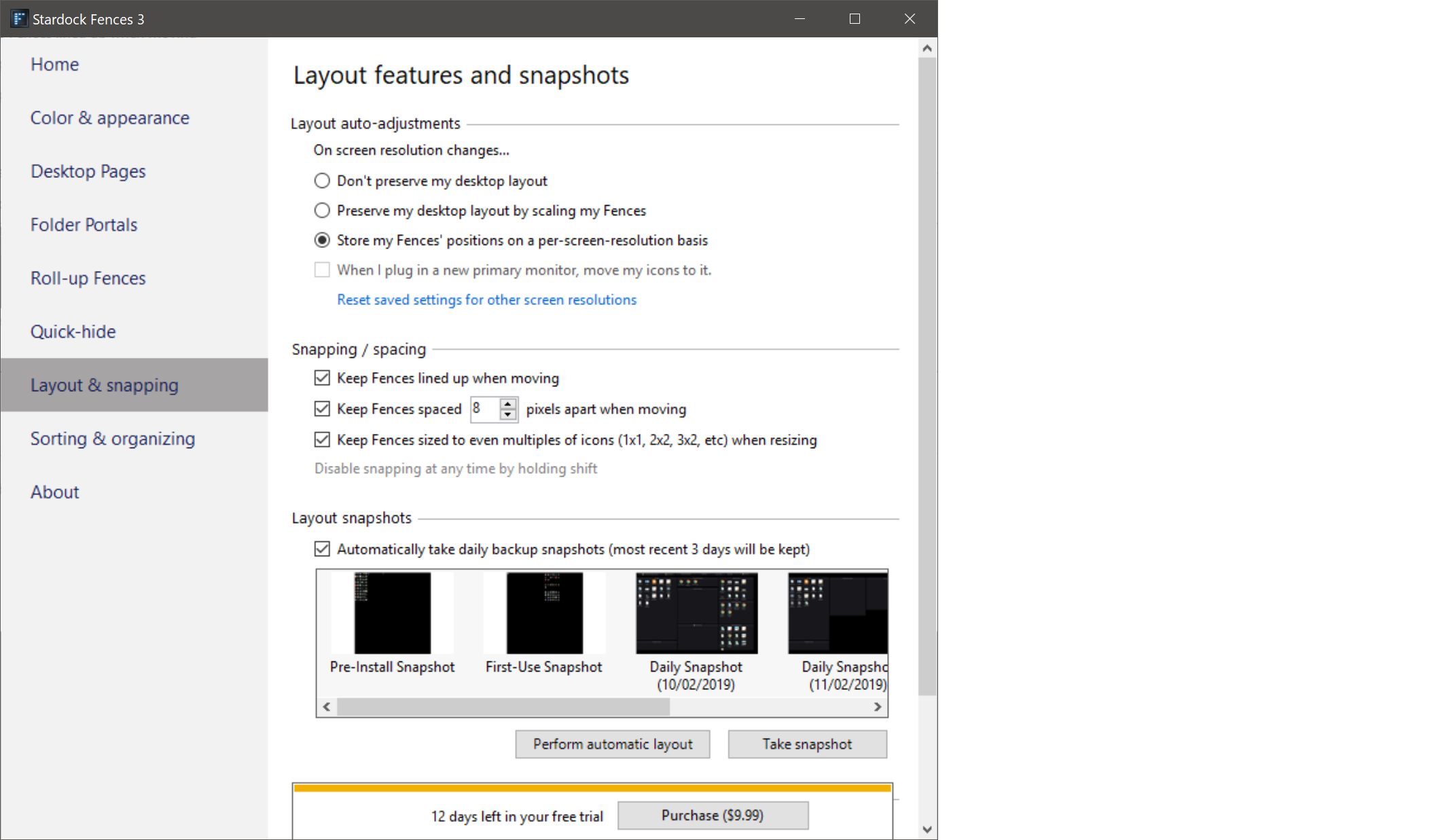
  • Fences Layout settings:


Reply #14 Top

Hello,

I have forwarded your problem to Stardock Support team for their assistance. Please keep an eye on this thread for any updates. We appreciate your feedback and patience.

Basj

Stardock Community Assistant.

Reply #15 Top

Hello,

Sorry to hear you are having trouble.

While my answer here needs to be looked at / attempted:

https://forums.stardock.com/491860/get;3731885

What we can't easily test is any type of 'USB Monitor' set-up - they always seem to prove troublesome in their results. 

----------------
Sean Drohan
Stardock Customer Service Manager

Reply #16 Top

sdRohan, I did attempt the steps in the answer you reference to no avail.  However, a few restarts later and it seems icon spacing have gone back to normal spacing.  Thanks for assistance though.