
Fence roll up bug
Fence roll up leave part of icon and text
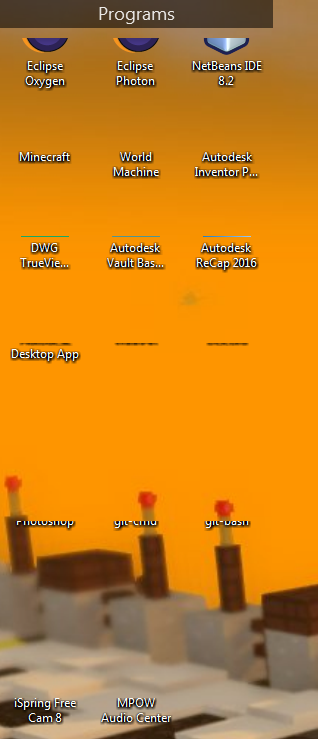
Part of the icons and text would remain there after a roll up fence is expanded and released. This happens every time and stays until a nearby area is clicked. 
Stardock will be closed for the week starting on Monday, June 29th and we will be returning on Monday, July 6th. We will be monitoring support tickets and forums during this time but expect delays in responses during this time.
Fence roll up leave part of icon and text
Part of the icons and text would remain there after a roll up fence is expanded and released. This happens every time and stays until a nearby area is clicked. 
Hello,
Sorry to hear you are having issues. Need more information.
1) Version of windows 7,8 or 10? and version 1809?
2) Version of Fences 2 or 3? If 3 what version 3.19.11?
3) Display setup, Single, dual or more Monitors? What resolution of each monitor and at what scaling? 100%, 150%? 250%?
4) Is Deskscape managing your desktop?
5) Hardware list also might help.
Thank you.
Basj,
Stardock Community Assistant.
Windows 7
Fence 3.09
Single monitor at 100%
I have Deskscape installed but did not add a wallpaper using it yet
I'm using a Dell Inspiron 620
Hello,
Thank you for the information.
First lets try the purge and reinstall. Use this steps : https://forums.stardock.com/486084/fences-support-faq#reinstalling
Download again the latest Fences from your account. And reinstall that version. Make sure to reboot before and after the installation.
Retest and report back.
Thank you,
Basj,
Stardock Community Assistant
Welcome Guest! Please take the time to register with us.