I am using 2 finger scrolling, Fences 3, windows 10. Folder portals scroll fine, but icon groupings do not. Any solutions? Could not find anything in Fences Settings.
End of quote
There is not as the desktop is not considered a 'folder' to Fences. There is a manageable work-around, however.
- Create a folder on the desktop - naming it to the group you would have as a normal fence ('Games' in this example)
- Move the desktop icons to 'Games'
- Create a folder portal to it Naming it the same - 'Games - Portal'
- Create a normal Fence, say 'Portal Desktop' to put the Original 'Games' folder in it
- Use the roll up feature to minimize the 'Portal Desktop folder'
- If you wanted to totally eliminate seeing 'Portal Desktop folder', you could use the 'Exclude from quickhide'
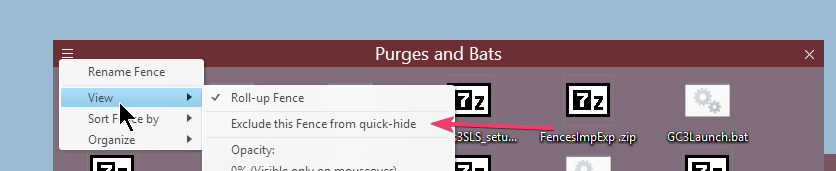
from all but the folder portal Fences you created - then use quickhide all the time.
That said, two finger scrolling is on the internal list of feature requests.
----------------
Sean Drohan
Stardock Customer Service Manager


 Stardock Forums
