Hide fences on startup

Was wondering if it is possible to hide fences on startup without having to hide them before turning off my pc.


Fences sometimes starts a bit laggy so I'd rather have it hidden on startup.


Some time ago someone reported that the feature was implemented already here:https://forums.stardock.com/367515/page/1/#2752443 , altough I can't seem to find it.
11,822 views 10 replies
Reply #1 Top

Hello,

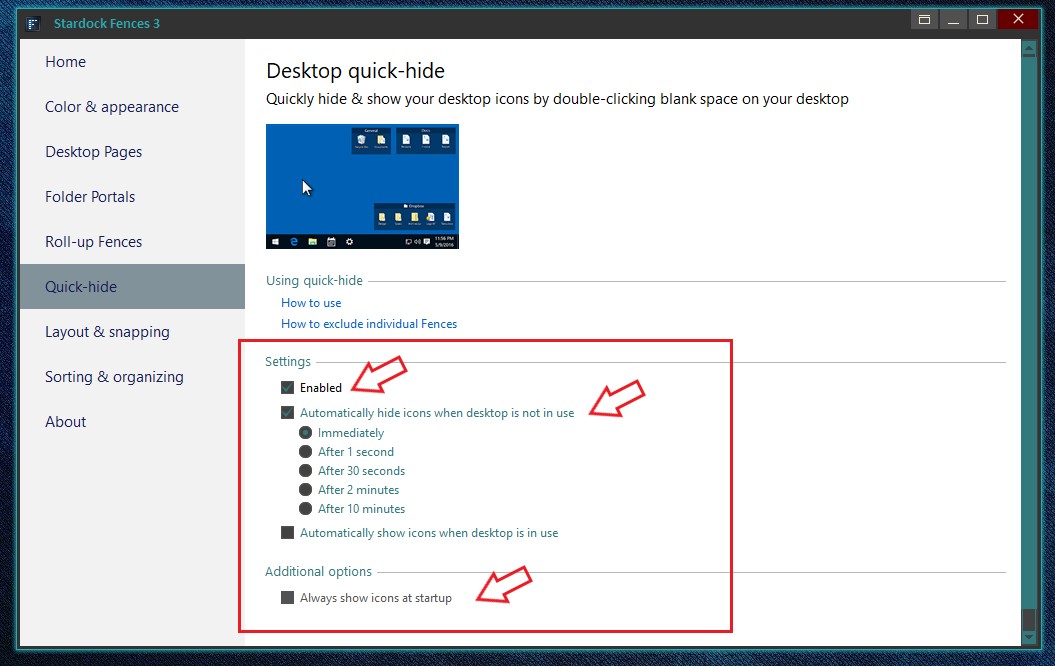
You can try these

Try adjusting those setting.


Basj,

Stardock Community Assistant.

Reply #2 Top

That would require me to click my desktop every time, I was wondering if they could just per default be hidden on startup.

Reply #3 Top

Hello,

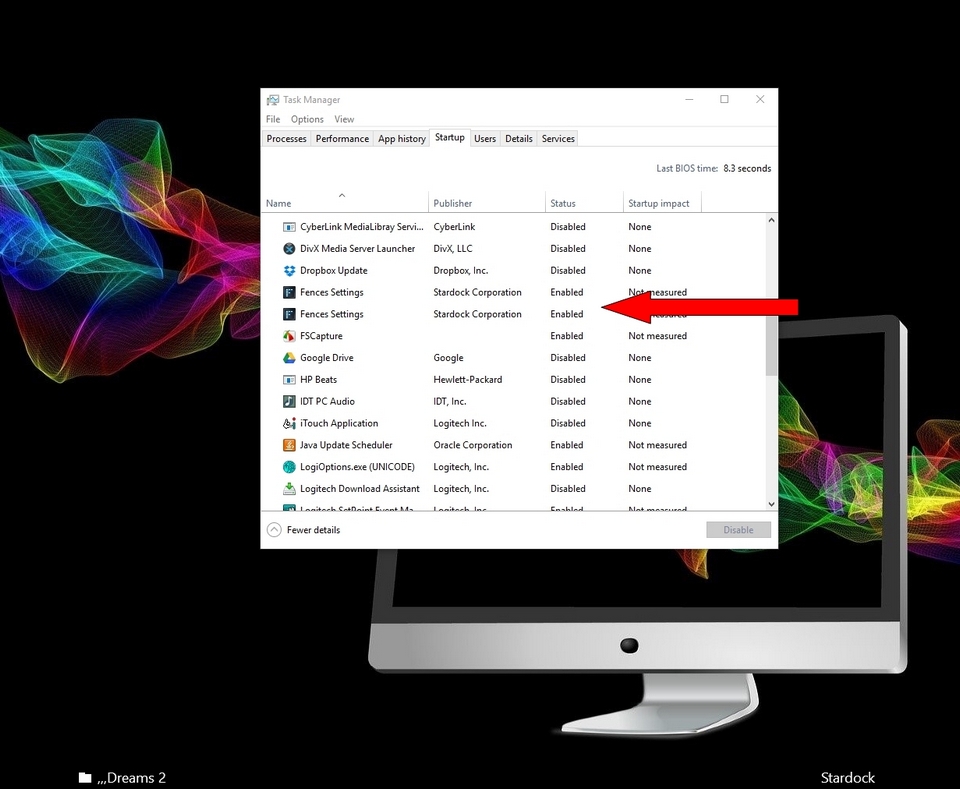
I'm not sure haven't tried it but you can try this disable Fences in Task manager at start up 

then click of fences after and make sure it works OK.


AzDude
Stardock Community Assistant

Reply #4 Top

Quoting AzDude, reply 3

Hello,

I'm not sure haven't tried it but you can try this disable Fences in Task manager at start up 

then click of fences after and make sure it works OK.


AzDude
Stardock Community Assistant
End of AzDude's quote


Thanks for your reply, but sadly this does not hide the fences/desktop items at startup.

Reply #5 Top

You could use this registry entry to disable Fences but you would need to reboot to see it happen.

https://cdn.stardock.us/support/uploads/ToggleFences.zip

----------------
Sean Drohan
Stardock Customer Service Manager

Reply #6 Top

Quoting sdRohan, reply 5

You could use this registry entry to disable Fences but you would need to reboot to see it happen.

https://cdn.stardock.us/support/uploads/ToggleFences.zip

----------------
Sean Drohan
Stardock Customer Service Manager
End of sdRohan's quote

That completely disables fences, which makes my icons show like this on startup.


Reply #7 Top

Quoting Huiskesmartijn, reply 6

That completely disables fences, which makes my icons show like this on startup.
End of Huiskesmartijn's quote

That is what you asked for, yes?

Was wondering if it is possible to hide fences on startup without having to hide them before turning off my pc.
End of quote

Reply #8 Top

Quoting sdRohan, reply 7


Quoting Huiskesmartijn,

That completely disables fences, which makes my icons show like this on startup.


That is what you asked for, yes?


Was wondering if it is possible to hide fences on startup without having to hide them before turning off my pc.


End of sdRohan's quote


Sorry, maybe I was not clear enough. I am talking about the quick-hide funtion, where icons are just hidden, and are shown again when double clicking on the desktop. I want the icons only hidden on startup, not fences disabled.

Reply #9 Top

Quoting Huiskesmartijn, reply 2

That would require me to click my desktop every time, I was wondering if they could just per default be hidden on startup.
End of Huiskesmartijn's quote
Un checking the option to always show icons at startup should fix your issue.


Reply #10 Top

Quoting RedneckDude, reply 9

Un checking the option to always show icons at startup should fix your issue.
End of RedneckDude's quote

Yes as what Jim said. Uncheck the "Always show icons at startup" and "automatically hide icons immediately" selected should do it. Let us know if you still need help on that.

Thank you,


Basj,

Stardock Community Assistant