
FENCES
Locking Thumbs.db
Fences is locking forever thumbs.db on remote folders. So we can`t delete, move or rename the folders. When fences is closed we can do it.
Stardock will be closed for the week starting on Monday, June 29th and we will be returning on Monday, July 6th. We will be monitoring support tickets and forums during this time but expect delays in responses during this time.
Locking Thumbs.db
Fences is locking forever thumbs.db on remote folders. So we can`t delete, move or rename the folders. When fences is closed we can do it.
Hello,
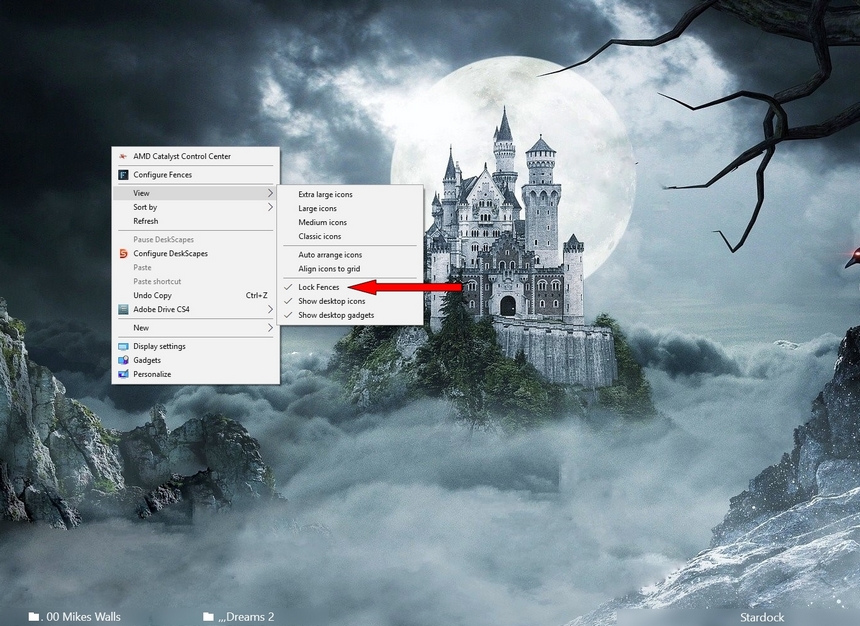
Sorry to hear you are having issues. Right Click on Desktop and Un Lock ( un check ) fences locked.
Then see if you still have the issue .

AzDude
Stardock Community Assistant
The option is by default disable.
It is not locked.
Hello,
I have forwarded your report to the Stardock support team for their review and recommendations.
Please keep an eye on this thread for any updates.
We really do appreciate your feedback, thanks.
AzDude
Stardock Community Assistant
Hello,
Could you try this work-around steps for portal fence link to a remote folder : https://forums.stardock.com/486084/fences-support-faq#folderportalsempty
Let us know if it work or not.
Thank you,
Basj,
Stardock Community Assistant
BASJ,
We are using Fences Portal pointing to Network Folders. The Windows file is being locked for all users.
3 monitors for 2 users (soon will be 15 users) and the screens full of fences. Your tip will not help, but thanks.
Will stardock reply about how to fix the bug?
How can I speak directly with the support?
Welcome Guest! Please take the time to register with us.