
Groupy

Just installed groupy, grouped some windows, saved the group as a test. Now can find NO WAY of opening them again. Looking for a way to open a window with the 3-dots showing, once again no luck. Run the groupy icon and nothing of use happens. What a waste of money, time to unistall after less than a day. Who's writing this stuff without any instrcutions on how to use? About time to give Stardock software a miss.
2,373 views 6 replies
Reply #1 Top

Hello,

Sorry to hear you are having issues.

1.First, make sure you have explorer.exe automatically group. (Listed in the Groupy setting -> Settings -> Application Grouping -> Listed in the box.)

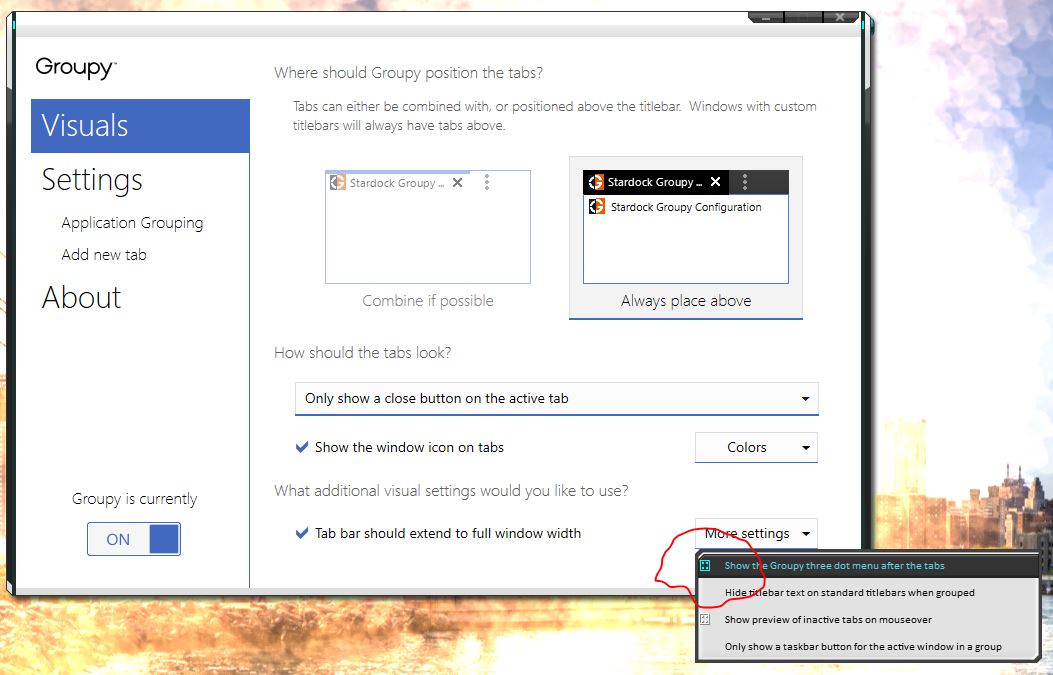
2. Make sure the 3 Dots menu after the tabs is selected.

If you have done that. You can get to your saved group by simply open windows explorer and 3 dot menu -> Saved Groups ->

BTW you also can create a shortcut to that saved groups and put it on the desktop or anywhere you wish. Click on that and it will also open that group.

Hope that help, please let us know if you need more help. Thanks

Basj,

Stardock Community Assistant.

Reply #2 Top

As it says on the save group dialog, you can access saved groups from the start menu.

If you are using 1.12 or later you can also set an application to always show a tab bar.

Reply #3 Top

Thanks for your help, I can see that now.

But how would a user know to open WIndows Explorer to find that there? It's not explained anywhere and that's a very basic fault.

That only alienates users right from the start because the basics aren't explained. No instructional PDF, video or help file, no direct support (if there is then the link is well-hidden - not intentional of course), just shove it to a community group which most people wouldn't bother with. No wonder they are struggling for sales and discounting this stuff. The snowflake programmers and supervisors (who are too close to their creations) need to get their act together and start providing basic instructions if they want to keep the custom that's so hard to attract in the first place. Repeat business is not automatic or a right, it has to be earnt. Maybe someone in the food chain will read this.

"How to get started" needs a complete rethink with Groupy.

Thank you again.

Reply #4 Top

Quoting arizsys, reply 3

Thanks for your help, I can see that now.

But how would a user know to open WIndows Explorer to find that there? It's not explained anywhere and that's a very basic fault.

That only alienates users right from the start because the basics aren't explained. No instructional PDF, video or help file, no direct support (if there is then the link is well-hidden - not intentional of course), just shove it to a community group which most people wouldn't bother with. No wonder they are struggling for sales and discounting this stuff. The snowflake programmers and supervisors (who are too close to their creations) need to get their act together and start providing basic instructions if they want to keep the custom that's so hard to attract in the first place. Repeat business is not automatic or a right, it has to be earnt. Maybe someone in the food chain will read this.

"How to get started" needs a complete rethink with Groupy.

Thank you again.
End of arizsys's quote

Perhaps because it actually tells you when you create a group?

That said if you had issues with it then others may well do and we will have to see about making it more obvious.

Reply #5 Top

Well I have uninstalled it now after wasting another hour on it. Created multiple groups of 3-4 and saved them. Loaded them again through Explorer and only 1 tab loads each time. Seems rather useless and has now been uninstalled. A waste of money. Very unsatisfied customer.

Reply #6 Top

Quoting arizsys, reply 5

Well I have uninstalled it now after wasting another hour on it. Created multiple groups of 3-4 and saved them. Loaded them again through Explorer and only 1 tab loads each time. Seems rather useless and has now been uninstalled. A waste of money. Very unsatisfied customer.
End of arizsys's quote

Were the explorer folders the same ones?

If you literally made a group of four identical folders then Explorer will not permit them to be opened as it is too smart and knows you have that window already opened and simply gives focus to it.

Also were you using 1.1 or 1.12 as later versions have additional bug fixes.