Do not automatically arrange symbols within a fence
from  Stardock Forums
Stardock Forums
Is it possible to not automatically arrange symbols within a fence?
Thanks.

 Stardock Forums
Is it possible to not automatically arrange symbols within a fence?
Thanks.
I assume by symbols, you mean icons?
I move mine in the order that I want them, they stay there. But if you mean in a grid, they do stay in the grid.
Thank you for the feedback.
Yes, I mean icons.
That they do stay in the grid is ok.
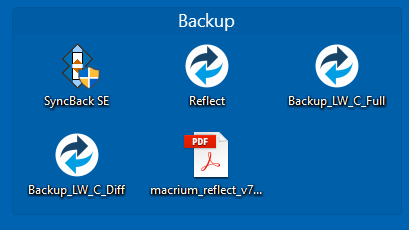
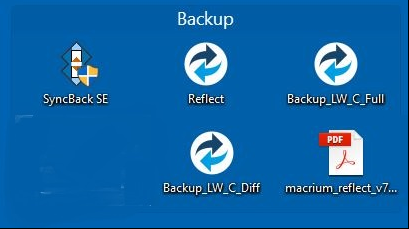
What I mean is that the icons are not arranged one after the other, as visible in picture 1, but that I can move the icons to where I want them to be, like in picture 2
picture 1
picture 2

Hello,
I have forwarded your report to the Stardock support team for their review and recommendations.
Please keep an eye on this thread for any updates.
We really do appreciate your feedback, thanks.
That is not possible and it defeats one of the core purposes of Fences - to organize. If one were able to put an icon anywhere in a Fence, it would start to look like the messy desktop it helps replace.
I do not agree. Everyone is entitled to his opinion.
But I continue to think that being able to place icons as we want could be an interesting option.
Yeah this is so annoying. I do NOT want my icons to auto-arrange. I have my fences set up for different thing. One for games, one for work, one for certain type of programs etc. I want to put them in the order "I" want to put them in, not the order it puts them in. Also, I don't want them all lined up in a row. I would like to put certain ones at the top left, certain at the bottom right of the fences etc. One of my main gripes about fences.
I've been a long time user of fences and have bought it multiple times over the years. This is the primary reason why I mainly just use it to hide my desktop. Everything is ordered on my desktop the way I want it. But I would love to have it where only certain sections are un-hidden at a time and not the entire thing. Disabling auto arrange and simply aligning icons within a fence to a simple grid would be the most ideal solution. I've seen posts about this from as long ago as 2011, 2013, 2014, 2015. This is not a non-trivial issue. It is one that has come up time and time again by a wide range of users. Please allow us to disable auto-arrange.
Hello,
Sorry to hear you are having issues.
At this time it's not an option , if that changes in a future update you will be notified .
AzDude
Stardock Community Assistant
When will it be added? Seems like it would be a really easy, much needed feature. I can't stand the auto arrange. Love the rest of it. I want to put them in the created box where I want them. Also don't want them to automatically "stick" to each other. If I want a space between 2 icons, I should be able to put it.
Being able to arrange icons in any order, in a Fence and on your desktop, is already possible and has been for many many years. Being able to set an icon apart from the group (however ordered) in a Fence is not nor will it likely ever be:

Being able do to that defeats a core purpose of Fences, to organized and tidy.
----------------
Sean Drohan
Stardock Customer Service Manager
Being able to arrange icons in any order, in a Fence and on your desktop, is already possible and has been for many many years. Being able to set an icon apart from the group (however ordered) in a Fence is not nor will it likely ever be:
Being able do to that defeats a core purpose of Fences, to organized and tidy.
----------------
Sean Drohan
Stardock Customer Service Manager
You and I must have VERY different interpretations of what makes things organized and tidy. For me, spacial organization is just at important as anything else. Just as one would move around their fences and place them in certain areas on the desktop. Would it not be reasonable to ask that we are also given the ability to organize the icons in those fences however which way we would like as well?
Hello TechPlasma,
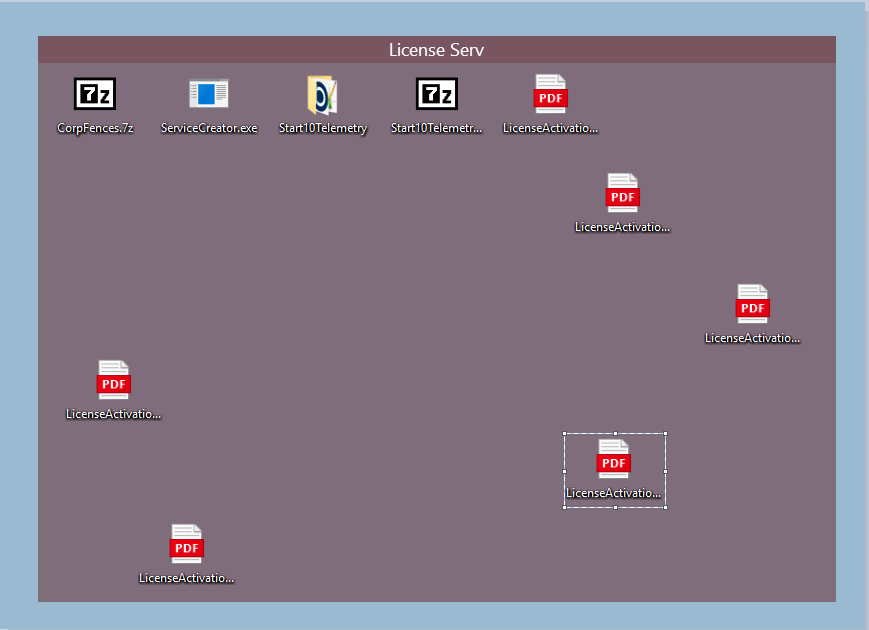
Can I ask your opinion on this potential look:
----------------
Sean Drohan
Stardock Customer Service Manager
So long as there is meaning for why each file is in the place that it is for a reason. It is not for me to decide on why that reason is. Everyone has their own way of organizing things.
But does that Fence (and any others like it) not start to look like the very desktop you are installing Fences to organize?
----------------
Sean Drohan
Stardock Customer Service Manager
In one of my use cases I have video files. From different active series. And as I watch the next episode. I replace the current file with the new one. But I like to keep all my series in the same order. But as soon as I delete the old file the list is reordered. And I have to spend time fixing the order so the series are all in the same place. Same goes for my in and out areas for my work.
I am with TechPlasma. Should be able to put them anywhere we want manually within a specific fence. And I am with him also, spacing is very important to some people such as myself. Its really the only thing keeping me from recommending this to other people.
The point is also that, You can set fences to auto-hide themselves. So I don't need to see the files when I'm not using them. That can't be said for the regular desktop. Sure you can hide the entire thing as a whole and that's why I keep fences installed. But one of the great features of fences is being able to completely hide the icons unless I hover over a specific fence.
Welcome Guest! Please take the time to register with us.
Select a reason for giving karma:
You're about to visit an external site:
Sign up here to get the latest news, updates, and special offers delivered directly to your inbox.
 WinCustomize Forums