




Universal Applications functionality
Remove from All Programs but keep in right pane
 Stardock Forums
So I love this program and what it offers and have been using it for quite some time. I don't like how the default Win10 Start Menu mixes modern apps with old school programs installs and want to keep things separated, so I manually organize my Start Menu with categories.
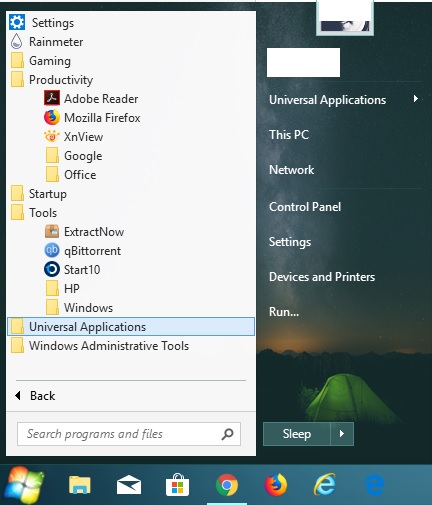
In the image above you can see, using the customization options provided within the Start10 program I have my Universal Applications in a separate folder within All Programs as well as shown in the right pane with sub-menu functionality. The issue I'm having is that I only want this to show up in the right pane and not at all in the All Programs section. To hide it from the All Programs section I use the following option:
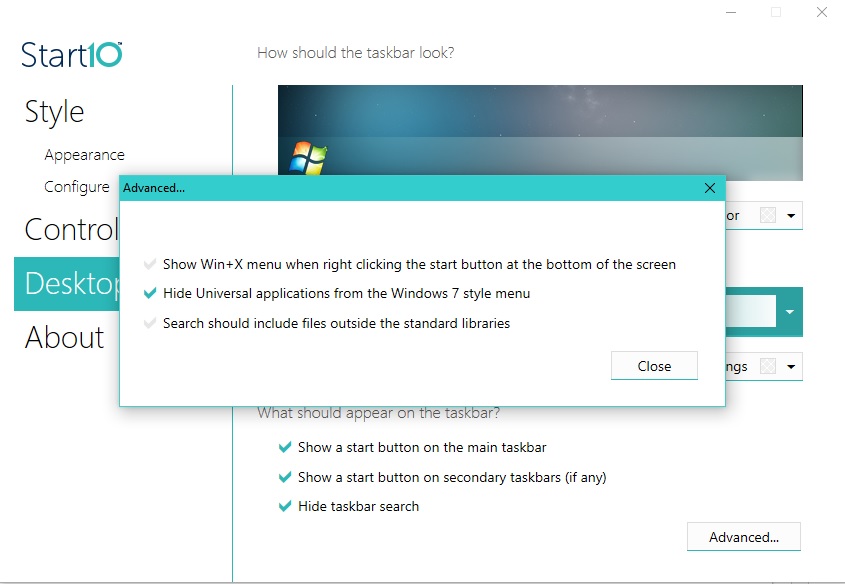
The issue is when I turn this option on it DOES hide the Universal Applications folder from the All Programs section, but it also causes the All Programs sub-menu function in the right pane to display a blank sub-menu. Not right away, mind you, but after some time it eventually causes the items in the sub-menu to disappear. Is there any method to hide the Universal Apps folder from the All Programs section without affecting the sub-menu in the right pane?
Thank you in advance for any insights.