Windowblinds and DisplayFusion/Ultramon

I have read the many a thread describing various incompatibilities between WB and two of the more popular multi monitor tools, Display Fusion and Ultramon. There does not seem to be a consensus on what works and what doesn't, in fact from what i can tell, it's down right subjective.

I own Ultramon pro and have it installed on Win7 and have just got back my WB, and of course i'm getting skinning issues with the taskbar on the secondary monitor. I have read of some that have no issues and some with many issues using either one of the monitor tools.

So to anyone out there using Win7, WB7 and either Ultramon or DisplyFusion, do you have any tips or info i can make use of to get the secondary taskbar to skin correctly?

Generally speaking, and i am yet to test it with a multitude of skins, but the second taskbar does not skin, it simply retains the aero look and color i have as default. (or with some skins, changes to a classic windows look) If i have an open program on that taskbar, there is skinning of the button for said program, but not the bar itself, which seemed to be the same issues in the other threads on here dealing with this. (most of which are some months, or even years old now)

Has anybody found and/or using a different monitor tool that works well with WB?

I don't mind having to make another purchase if something other than Ultramon will work. All i am looking for is a taskbar on my secondary, that's all i require of the software. (one that will skin obviously!)

That being said, WB takes precedence over a monitor tool, so im dealing with a most ugly secondary task bar atm...
:)

27,616 views 25 replies
Reply #1 Top


So to anyone out there using Win7, WB7 and either Ultramon or DisplyFusion, do you have any tips or info i can make use of to get the secondary taskbar to skin correctly?
End of quote

Nothing can be done. Especially about WB vs Ultramon (Dunno about DisplayFusion) and Win7.
It's a known issues on both parts. Dunno what's being done about it - if anything.

On Vista on the other hand.... It works perfectly!  :grin:
 YAY for Vista!

\o/ \o/

Reply #2 Top

Thanks mate! Who'd have thought, for even just a fraction of a second, that Vista would be better to have than Win7! LOL

It strikes me that this is a perfect are for SD to get into. Perhaps they could make their own multi monitor app, that obviously, would be perfectly skinable. In fact, the more i think about it, i'm surprised they haven't done so already.

Reply #3 Top

Quoting Neilo, reply 2
Thanks mate! Who'd have thought, for even just a fraction of a second, that Vista would be better to have than Win7! LOL
End of Neilo's quote

I have several reasons for sticking with Vista. One of them being RightClick. ;)

Quoting Neilo, reply 2

It strikes me that this is a perfect are for SD to get into. Perhaps they could make their own multi monitor app, that obviously, would be perfectly skinable. In fact, the more i think about it, i'm surprised they haven't done so already.
End of Neilo's quote

With a bit of effort Tiles could be the perfect replacement for the taskbar, and perfect +1 if adapted to support a multi monitor setup!

Reply #4 Top

Deskscapes does an excellent job with multi-monitor wallpaper & dreams. You can use Objectdock and Tiles to give you the additional taskbar function. I have 3 monitors and use Tiles on the left, the W7 Taskbar in the middle and a Winstep Shelf on the right.

Reply #5 Top

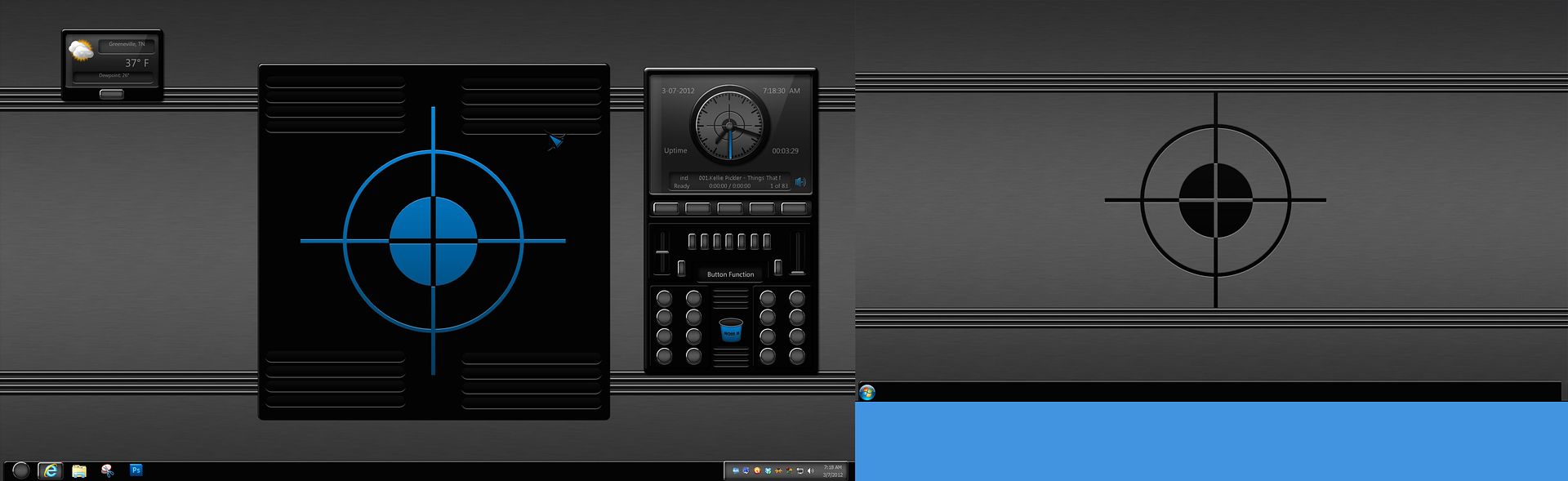
DisplayFusion works pretty well on Win 7 64 bit. Only problem I have is that the systray and clock do not appear on the second monitor taskbar, but the taskbar is skinned by WB just fine.


Blue area added for contrast. 

+1 Loading…
Reply #6 Top

Anything opened on the second monitor will have taskbar buttons on the second monitor.

Reply #7 Top

Hello,

I've been using Display Fusion for a year or so now. I'm on W7, 64 bit, with 7.7 Index. 

  1. I use Winstep when there is a matching skin, otherwise I use Display Fusion
  2. The Display Fusion task bar skins with Windiowblinds skins, but is a little ugly.
  3. The Start button skin is the Vista's default Start Button
  4. The texture/image quality is lower that the regular task bar
  5. The left task bar edge is clear
  6. The task bar does not display: date, time, and pinned programs
  7. I use the Display Fusion's title bar buttons daily  and I will probably use them for a long time
  8. I've used Object Dock as a second task bar, but like Display Fusion, the task bar does not compare to the actual task bar
  9. Tiles is great, but it is an inadequate task bar replacement, See next note
  10. Tiles: does not reserve screen space anymore, does not support multiple bars on multiple monitors, and does not have a start button

I would love to see multiple monitor task bars added to Window Blinds, Until then, I am very interested in batter software for multiple monitor task bars.

Reply #8 Top

Quoting RedneckDude, reply 5
DisplayFusion works pretty well on Win 7 64 bit. Only problem I have is that the systray and clock do not appear on the second monitor taskbar, but the taskbar is skinned by WB just fine.
End of RedneckDude's quote

As far as I know there are no multimonitor app that -can- add the systray to secondary monitor(s). Would be great though....

Reply #9 Top

DF puts the clock and date in the systray area if you're running Windows Aero. Not with a WB applied though.

Reply #10 Top

Quoting chuckve4, reply 7
does not reserve screen space anymore
End of chuckve4's quote

I haven't had any problems with reserved screen space. Is it all programs?

Do you have both "Make the bar appear on top of other windows" & "Keep bar visible when windows are maximized" checked?

Reply #12 Top

Thanks for the replies guys. I have Tiles and Object dock 2 running, but i'm pretty anal about my taskbars. I like my docks to work with my taskbars instead of, instead of them.

RND! Thankyou! I'll go and grab DisplayFusion and try it out. I'm assuming it will be fine since the skin i am using right now is your Hardwood. (excellent work btw!!)

I don't require anything on my second task bar other than open programs on that monitor to have it's buttons there. I use tiles and docks for all my app launching needs on that screen, so as long as the bar skins, i'll be happy.

Again, thanks for everyone's replies.
:)


Reply #13 Top

Quoting Lantec, reply 10

Quoting chuckve4, reply 7 does not reserve screen space anymore

I haven't had any problems with reserved screen space. Is it all programs?

Do you have both "Make the bar appear on top of other windows" & "Keep bar visible when windows are maximized" checked?
End of Lantec's quote
I can't say

Yes, both settings are checked, and I've tried turning them on & off. In the Beta, I found reserve failures could be fixed by turning them on and off. Unfortunately, I can't say I've seen a program that does work with the reserved space since the beta ended. Fortunately, maximizing on the monitor with Tiles isn't a big deal for me.

After I finish troubleshooting a browser problem, I'll probably try re-installing Tiles, but I'm not worried about it at the moment.

Thanks

Reply #14 Top

Just thought I would add my own delayed 2 cents. I have found that skins with transparency will show a ghost image of the rectangle taskbar beneath. Thinks like Fearamone won't display correctly, while other taskbars with the same default shape will.

This is Windows 7 x64 with Display Fusion and WB

Reply #15 Top

Hmmm i hadn't noticed, i have the blind, i will check it our and see if it happens on mine as well.

<edit> Yup, i have the same thing. i hadn't noticed it before, thought the skins i have been using have featured full size taskbars, so it's not been apparent. <edit>

Reply #16 Top

I was going to open the same thread and read this . so why it doesn't work. well, hyderdesk themes work great with ultramon. isn't that weird? so it must be a WB problem. isn't there a way to match the ultramon taskbar with the win7 taskbar?

i want the same taskbar style on the secondary screen. pleeeeeeeeeeeeeease ...with sugar on top!!!

Reply #17 Top

Having no issues with DF, bite the bullet and switch over from Ultramon, i have.
:)

Reply #18 Top

ok, but i paid for it so i want to use it :rofl: :rofl: :rofl:


Edit: DisplayFusion is fu**ing awesome. bought it!!!  :grin:

Reply #19 Top

Yeah i was of the same opinion, but like you, about 10 mins with DF was all i needed. Not going to hurt to have two pro versions, who knows what either app will do with future updates.

Reply #20 Top

If you have an ATI video card that supports Eyefinity, you can set up an Eyefinity group and run one large desktop that will deliver a skinnable taskbar across both monitors.

Reply #21 Top

Quoting CarGuy1, reply 20
If you have an ATI video card
End of CarGuy1's quote

No need to swear at me!!
;P
(yes, I'm an Nvidia fanboy....)

Reply #22 Top

I used to use Nvidia cards until they stopped supporting dual monitor spanning. The last OS they supported it in was XP.

While dual monitor spanning isn't the greatest for gaming, it works very well in other applications.

It appears to me that Nvidia thinks the only use of multiple monitor spanning is for gaming.

Reply #23 Top

What is that, CG?  Can ya splain it to me?

Reply #24 Top

Quoting RedneckDude, reply 23
What is that, CG?  Can ya splain it to me?
End of RedneckDude's quote

Easier to link to it.  On a consumer level,  ATI Eyefinity will support as low as 2 monitors and as many as 6.

Reply #25 Top

-_-