Frogboy Frogboy

Object Desktop: Status Report 2011

Object Desktop: Status Report 2011

Greetings! Long time no see!

So what’s going on with Object Desktop these days?  The answer: A lot. Much of what we’ve worked on for the past year hasn’t gotten communicated very well to our consumers and I apologize for that. 

As some of you may know, we sold Impulse to Gamestop last year.  A lot of people couldn’t believe that we would sell our most profitable business unit. But I suspect some of you will understand why.  It was consuming us.  In another year, Stardock would have been Impulse and little else.  And if money were the only purpose in life, maybe that would be a good thing.  But Stardockians want to make cool stuff, not put all our time into selling other people’s stuff no matter how cool it is.

image

This past year

That isn’t to say we haven’t been able to release some really cool stuff in the past couple of years.  Fences was recently regarded as the “best. program. ever.” by CNET. WindowFX 4, DeskScapes 3 upped the ante and while not part of Object Desktop, ObjectDock 2 came out this past year. And there have been updates to WindowBlinds, SkinStudio, IconPackager and Theme Manager in recent times to keep building on their success.

The cost of compatibility

At this stage in the development of desktop enhancements, we have to make some tough choices.  The #1 slow down to our development cycles has been trying to get things to run on Windows XP, Windows Vista, Windows Vista 64, Windows 7, and Windows 7 64.  And we are already developing for Windows 8 as well which is, in itself, a pretty significant departure.

So on the one hand, customers want new stuff and lots of updates but on the other hand they want their OS supported and we just don’t have the manpower to do that.  Back in the Windows XP days, we could crank out a ton of cool stuff.  Now, we have to worry about whether certain system DLLs will be available on Windows 7 “Ultimate” vs. Windows 7 “Home” or whether they were taken out entirely after Windows Vista Business.  Desktop Enhancements: Fun times.

Of course, in the old days, I was around to keep everyone in the loop on this stuff. For a lot of our long-time customers, it’s not the slow down in new programs but the lack of communication. Hence, the hidden cost of the focus on Impulse for the last couple of years.

Where we are now

So let’s talk about what’s happening NOW

Tiles

image

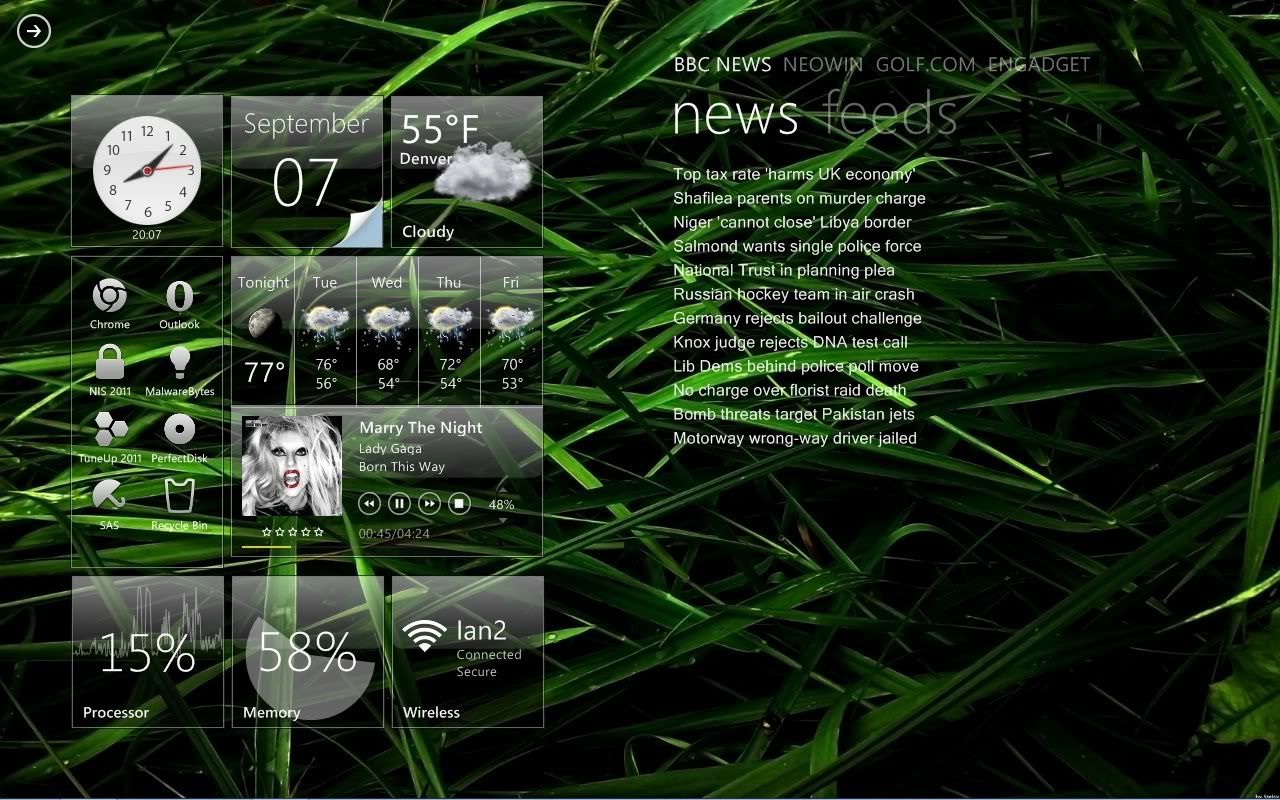
Our most radical new program is called Tiles. There’s an early beta of it on Object Desktop right now. It’s designed to enable users to manage their tasks in “pages” of tiles that represent what they’re currently working on or will be working on.

In the old days, we made virtual desktops. That made sense when we were all running on individual, low resolution monitors.  But today and into the future, high resolution, multiple monitor setups are how power users work and what they need are things that let them make full use of that.  That is the purpose of Tiles.

Carousel

In a similar vein, we’re working on a new program that will let you more effectively switch between running tasks via your keyboard.  Microsoft and Apple have each tried their hand with this but we have felt they spent too much effort in making it demo well versus being a practical tool.  And let’s face it, Alt-Tab is starting to get pretty long in the tooth.

WindowFX 5

WindowFX 4 was a significant departure from the old “special effects” concept of WindowFX.  That was because on Windows Vista, all those cool DWM effects were not hardware accelerated (Microsoft wasn’t hardware accelerating a lot of things in Windows Vista and had deprecated GDI+ and at first had removed hardware acceleration).  But in more recent times, hardware acceleration has returned, particularly in Windows 7’s DWM.  This has meant we can start adding lots of cool effects.

DeskScapes 4

DeskScapes is continuing to evolve as we prepare for the day of letting pretty much everyone make their own dynamic content for it.  The idea is to make it so that the desktop background isn’t limited to being pretty but can be made into a useful area.

WindowBlinds / SkinStudio

There’s not a lot to tell (publicly anyway) as a lot of work involved with Windows 8 that we can’t discuss.

Fences

There’s been screenshots of Fences 2 floating around. We have no ETAs on it yet as seeing what is (and isn’t) doable on Windows 8 is taking up some time.  But there’s a lot of interesting new features in the works including letting users define a directory as a Fence as well as having Fence “pages”.

IconPackager

We’ve had a hard time with Windows 7 folders and we’re not sure if this is going to be cured in Windows 8.  If it’s not, we may make changing the default folders of Windows 7/Windows 8 become a “hidden” (i.e. off by default, unsupported) feature.

imageProgram X

Not so much a secret but rather we haven’t come up with a name for it yet. It’s a program for skinning the new Windows 8 immersion UI.

Program Y

Same thing, not secret but a program that takes some of the non “FX” parts of WindowFX and graduates them to their own program.

DesktopX

I don’t have a lot of good news to report on this.  The effort in making it work well on all these versions of Windows is not going well at all.  We are still deciding its future.

Theme Manager

Theme Manager 4 has become our preferred method of applying suites.  We killed MyColors entirely.  So over the coming months you’ll see a lot of of the MyColors themes become Theme Manager .suite files.

CursorFX 3

We are looking at updating CursorFX to support the DWM but it is still in the planning stages as we’re not sure the demand vs. cost of this yet.

SoundPackager 2

This is more an area where we need to bring in more developers.  We’re hiring btw. Smile  If you’re a great developer you can even work from remote.

Tweak 8

Just waiting for Windows 8…

Legacy Programs

Some… a lot of programs are not going to make the cut.  One decision we have made is that if we can’t make it work on Windows 8, it’s dead. That doesn’t mean we won’t still have it available but we won’t be doing updates for it anymore.  Another decision is that we will be ending support for Windows XP pretty soon. We haven’t decided a date but what it means is that after that date, we won’t be testing on Windows XP anymore on new releases. So a program may work…or it may not.  The same is true with Windows Vista.  It’s absolutely murdering us trying to support all these OSes.

So let’s look at the programs that won’t be getting love:

RightClick, TweakVista, Virtual Desktops, LogonStudio, BootSkin, MyColors, ObjectBar, Keyboard LaunchPad.  They’re still available but we won’t be supporting or updating them.

GUI Championships

There will be a GUI Championships in 2012

WinCustomize 2012

There will be a revamp to WinCustomize 2012.  It will be more evolutionary than revolutionary. The main area will be performance and new features rather than a whole new look or something.

So that’s where we’re at.

54,984 views 76 replies
Reply #51 Top

Quoting RedneckDude, reply 49
You do now because the addition of UAC hampers the old dx plugins.
End of RedneckDude's quote

not entirely accurate.

some of the "plugins" don't work but most of the Object Types still work. The system information plugin works, the email notifier works, the performance meters are somewhat borked, etc. But the basic tools that made DX great are still there and they still function. People just have forgotten or never knew how to use them. Also, lets not forget one of the greatest tools that DX has, Aniutil!

Reply #52 Top

You don't NEED to do any scripting at all to make fantastic DX themes.
End of quote

This is true. DX can do a lot without scripts.


I would love to know statistics on how people actually use DesktopX.

End of quote

Ditto.


ID you bring up a good point, are folks using DX to do things for their own personal use and not uploading them. 
End of quote

All the time. That's why I love the program, because I can make little single-task scripts and package them in a nice-looking interface without much hassle. But, I doubt anyone would have much use for a Pick A Number Between... widget. If I'm running a DXtheme, it's usually one I'm building.

I sure hope DesktopX still has a future; there's nothing else quite like it.

Reply #53 Top

Quoting sViz, reply 52
This is true. DX can do a lot without scripts.
End of sViz's quote

But not fantastic things, unless I'm missing something.


Quoting sViz, reply 52
If I'm running a DXtheme, it's usually one I'm building.

I sure hope DesktopX still has a future; there's nothing else quite like it.
End of sViz's quote


Ditto.

Reply #54 Top

I haven't got a clue how to make anything with DesktopX, but I use it all the time. As long as it still functions on Windows 7, and it's not economically justified to do a serious makeover, how about just keeping it alive by fixing what appear to be small problems in 3.5? The tools are marvellous.

Reply #55 Top

Quoting RedneckDude, reply 53
But not fantastic things, unless I'm missing something.
End of RedneckDude's quote

I would suggest you go back in to the depths of the DesktopX gallery and look and the old stuff. We weren't using scripts then.

The biggest things that have been in desktopX themes that REQUIRE scripts are Calendars and Weather. I can live without them myself.

Reply #56 Top

Phoon, are you using XP?

Reply #57 Top

Although i myself have only made 1 widget in DX it has been the most fun i have had out of any of the stardock programs, yes the scripts were not new but i spent many days making improvements to what i had, there would always be something else that i could put on it. I should think it wouldn't take much to fix some of the bugs in the current version then leave it as that

Reply #58 Top

No, I'm using 7 x64 and I cranked UAC up just for the heck of it.

Note - I have not tried many OLD themes lately but I was able to create some new items noted in #51 and they worked fine. DX 3.5 - Not Pro.

Reply #59 Top

The only thing I have tried lately that didn't work was the email notifier. It tells me I have mail when I don't...lol.


DX, to my knowledge, without scripting or with, for that matter, hasn't the ability to auto detect 4 + cores. Many sidebar gadgets can. I'd love to see that done.

I'll look at some of the older things in the gallery, but I have to say I haven't seen anything fantastic done without script, ever. I guess what I think of as fantastic may not be what others see as fantastic.


If I'm wrong, I'd love to be shown.

Reply #60 Top

Quoting RedneckDude, reply 59
I guess what I think of as fantastic may not be what others see as fantastic.
End of RedneckDude's quote

That is quite true.

Here is a good example. You see, Redneck may find this to be fantastic:

Where I on the other hand would find those chairs to be a tad uncomfortable.


:rofl:   Git-er-done!

Reply #61 Top

Reply #62 Top

My guess is that one of the projects that you will see, either X or Y, will be similar to the look of the Omnimo Rainmeter skin. A very 'customizeable' look for the new Windows 8 system..........Numerous color options and numerous gadgets - all easy access right on your desktop. I must admit I've got a little hooked with Omnimo playing with all the variations etc but many of my Stardock applications is still running but not currently showing.............Just think of all those different tiles of boxes on your desktop that match an underlying Windowblind. My mouth waters at the mere thought of this potential...........and I'm sure Stardock have not missed this thought pattern either. Just speculation on my part, though :-"

Here's my latest try with Omnimo.........

Reply #64 Top

Nice!!!

Reply #65 Top

You don't NEED to do any scripting at all to make fantastic DX themes. We made some pretty damn cool stuff before the ability to script was put in. Either people forgot how or they just aren't interested in learning the application anymore.
End of quote

To do some advanced stuff like meters, media players and mail-monitors we relied on pretty cool plugins those days, some Stardock-made and some by users. That was until the plugin creators just went on and let the plugins die. At least Stardock would have to update their own plugins, so even more work for them. Today the principle of leaving work to users doesn't work so good anymore. You can see that by looking at the available translations of Stardock software (I have no problem with english as You know, but I still think if there were decent professional translations there could be much more non US sales, but that is me, I am not a sales expert).

IF Windows 8 will be all Metro Design I see a pretty good chance to push DX as a framework for all the desktop stuff (as Leo staed already). That is if DesktopX is developed further, not with all the bugs it has now.

I would be so glad if there was a chance to at least get DX working reliable on 64bit. At the moment I use an older Win 7 32bit machine for developing stuff, as I have constant crashes in developer mode on 64bit. Once it is a gadget there are no problems at all. Working as designed on all different machines.

One question though: Isn't DX used as a framework for games anymore ? I know it was once.

Reply #66 Top

Related to this thread, anyone who is a facebook friend of Stardock should visit the Stardock facebook page.

Reply #68 Top

I did, I did.  :-"

Reply #69 Top

Tiles demo:

http://youtu.be/5dPmRbyAY5s

Reply #70 Top

Quoting c242, reply 65
I have constant crashes in developer mode on 64bit.
End of c242's quote

HA! Back when I was making themes (using xp 32 bit) that was normal behavior. You learn quickly to save often and use different names.

Reply #71 Top


I am really liking the direction for Deskscapes 4:

DeskScapes 4

DeskScapes is continuing to evolve as we prepare for the day of letting pretty much everyone make their own dynamic content for it.  The idea is to make it so that the desktop background isn’t limited to being pretty but can be made into a useful area.

Reply #72 Top

Great news.

I am thrilled about the direction of Deskscapes.

5* k6

Reply #73 Top

WindowBlinds:  I'm very skeptical about W8 at this point.  I REALLY hope that there will be a WindowBlinds 8.  If not, then screw Windows 8.  I absolutely refuse to run boring Aero/(or even worse, "Metro")'s interfaces.  Not an option.  Please continue making Windowblinds Stardock.  Same goes for Skinstudio, with legacy support for Win 7/Vista.

WindowFX5:  I almost decided to buy WFX4 (I ran the trial), but it didn't pack enough "cool" transitions like the older versions did.  I hope that WFX5 will pack both "useful", and "fun" window effects. 

DeskScapes 4:  It would be WAY COOL to be able to create & view 3D backgrounds.  However, stereoscopic 3D displays aren't commonplace yet.

DesktopX:  I enjoy having weather/time widgets on my desktop, but if you're ready to pull the plug, i'll be prepared.  I'd have to find stand-alone widgets elsewhere. 

IconPackager:  Please let IP6 have backwards compatibility with Seven/Vista. It would also be cool if IP6 had built-in image editing effects for either individual or groups of icons;  such as adjusting brightness, contrast, sharpening, and some Photoshop-like artistic effects (ala Word 2010).  All without affecting the original icon file.  That would probably take a lot more memory to run.  Just a thought.

LogonStudio:  WHAAAAAAAAAAT?!  No LogonStudio for W8?  I'm sticking with Vista/Seven now.  Not to mention Stardock hasn't released a BootSkin in forever.  Won't expect to see that neither.

Caurosel:  I like the sound of it.  Alt-Tab is very...linear.  It goes one way at a time (Hold "Shift" to go in reverse).  Flip3D is cool, but is just a glorified version of Alt-Tab. *performs Flip3D*.  I didn't know that DeskScapes' background was live on Alt-Tab, Flip3D 'til just now.  Neat.

Tiles:  I don't know about you guys, but Tiles looks a lot like the old Vista Sidebar, except more practical and minimalistic.  I hope we see a public Tiles release for non-Object Desktop users soon.

Fences:  Is such an awesome program.  I use it everyday.  I wish that there would be skinning support instead of just adjusting hue/transparency.  But I love Fences either way.

I don't care much for SoundPackager, CursorFX, MyColors, Tweak(insert OS here), or RightClick.  But to each his own.  I hope Stardock continues support for these programs anyway for the other fans.


Reply #74 Top

Just when I'm thinkin' about getting into DX it may go the way of the dinos. Boogers! I don't use Fences although I still have the installer. On my old laptop I had it set up without any icons on my screen, just lots of shelves to put stuff ( in Nexus, docks and bins).

Reply #75 Top

Don't lose DesktopX please - at minimum make it's current existence/function compatible - it already works pretty well on Windows 7.

Is there an as easy to use gadget engine in Windows 8?

I still think using WFX's method of display a 'window animation' could be used to display DesktopX Objects while they are moving i.e. accelerated animations.