
Fonts changing on their own

Ok - I have been going crazy on this one. But I now know that it isn't me. This has happened on several skins, so it is not a skin issue.

Window Blinds allows the skin developer to define the fonts used for several places in the interface. However, I have noticed that after time has passed, the desired font is being replaced by some other font in many areas of my interface. The most noticeably is the System Time on the task bar. I have taken 2 screen shots to show the good and the bad.

When I first apply a skin or when I reboot, this is what I see:
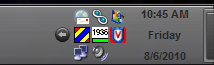
original font

After some time the font changes to this:
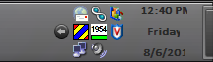
corrupt font

See how it is now different - bold as well as a different font I think.

Re-applying the skin will force the font back to what it should be - at least temporarily.

Any ideas about what could be causing this? Or better yet, is this a bug in WindowBlinds that needs to be addressed? If you think I need to submit a bug report, let me know.

Einstein

OS: Windows XP sp3
WB version: 7.1 build 90 (x86)
Video: nVidia GeForce FX 5200

5,870 views 9 replies
Reply #1 Top

bump

Reply #2 Top

Ok - I have been going crazy on this one. But I now know that it isn't me.
End of quote

Thank you.....I thought it was my imagination.


Your computer has a Windows Experience Index base score of 5.9
Your Windows Graphics Experience score is 7.5

WindowBlinds version : WindowBlinds 7.1 (build 273 - Windows 7 Edition) - 64 bit OS

WindowBlinds is installed correctly on this PC
WindowBlinds appears to be activated on this PC
(Generic PnP Monitor) 1 is attached to ATI Radeon HD 4870   
(Generic PnP Monitor) 2 is attached to ATI Radeon HD 4870   

Wblind.dll            2010/06/07 15:10:20
Wblind64.dll         2010/06/07 15:10:52
Wbsrv.dll              2010/06/07 15:10:56
SevenConfig.exe   2010/05/20 16:47:02
Wbload.exe          2010/02/02 15:33:18
Wbhelp.dll            2009/10/07 16:35:07
Tray.dll                2009/10/21 10:13:19
Wbload.dll           2010/06/07 15:10:25
Screen.exe         2010/04/01 17:39:26

Reply #4 Top

Looks like this one, Neil: LINK

Reply #5 Top

This maybe a problem I have already reported to Neil.


Try this...just open WBconfig...does it change?Does it change when you close WBconfig?

It happens to me whenever I open either WBconfig or SKS.

Non system fonts will change and then change back if I keep opening WBconfig.


Reply #6 Top

Yup, Neil, it is Aero Station - that skin totally rocks - best non-Master skin I have seen in a LONG while. (odd, I have a lower Member No. than Niel Banfield - how did that happen?)

I will give the WBconfig thing a shot - I just rebooted Monday morning and it still works fine. It does happen with most of the skins I try, but it might still be in the way non-system fonts are displayed when Windows tries to refresh the whole User Interface. Maybe?

Reply #7 Top

I think I know what it is - the Calibri font was not on my PC. It is part of Office 2007 (and probably Vista as well) as a replacement for some of the older basic fonts (Arial, Times Roman, etc.) So I followed the procedure to install the Power Point 2007 Viewer (which includes those newer fonts). I will now give it time and see if the font changes on me or not.

Reply #8 Top

Thats what I thought also but even the fonts that are installed already do it too.It IS probably related to the fonts specified in the fonts to install section of SKS.

Those are the ones that change...even if they are installed to Windows.

Reply #9 Top

Nine days and hasn't changed on me once. But you may have something with fonts that get installed from the UIS (SKS, whatever). But that would mean I have to change skins to test it, and right now, I am totally loving Aero Station.