Neil Banfield Neil Banfield

WindowBlinds 6 Beta Feedback

WindowBlinds 6 Beta Feedback

Please post all feedback about the WindowBlinds 6 beta on this thread.

Note that the beta is for 32 bit XP and Vista systems only.  Please do not post about it not working on 64 bit XP/Vista.  Please continue to use WB 5.51 on those platforms.

This beta is for Object Desktop customers ONLY.  Standalone WindowBlinds 5 owners will not be able to activate this build.

Please note that you must have Stardock Central 2.46 Build 154 or later to install the WindowBlinds 6 betas. If you try and use older versions, it'll eventually timeout and give you an error about an invalid URL.

If you have problems with it running at all, please uninstall WB6, reboot and then try reinstalling WB6 again.

150,167 views 537 replies
Reply #226 Top
Ran across a new problem with .026 - active window frame right is painting lighter than the source image, by about 20 RGB points.


The image on the left is how WB6Config previews the close button & top portion of the window frame right (correctly). The image in the middle is the source image. The image on the right is the close button & top portion of the window frame right as WB6 applies it to the active window - you can easily see the lighter hue of the two right-most pixel columns (the top portion of window frame right). Using magic pink trans.

Did not notice this until the .026 update, but could have been there before since it is subtle.
Reply #227 Top
I'm getting a button glow effect after image when using Diamond.

Mousing over the buttons makes it go away.
If I have multiple windows open, mousing over the button on the other windows have no effect, it has to be the one it originally came from.


Reply #228 Top
HI ALL, All went well with my instal on XP and had no problems with the themes so far. THANKS toALL AT Stardock    
Reply #229 Top
Leo vista- calendar is not skinned when you expand it from the taskbar... shiny purple colours!
Reply #230 Top
Working for me now at least All is well except.


The rounded taskbar has a solid background behind it thanks to the sidebar. Even when skinned by WB6 this issue still occurs.
Reply #232 Top

I'm getting a button glow effect after image when using Diamond.

Mousing over the buttons makes it go away.
If I have multiple windows open, mousing over the button on the other windows have no effect, it has to be the one it originally came from.


Bichur, looks like it's a bad skin cash problem, try open the skin folder and delete all files with the extension ".WB4" and reapply the skin.


Working for me now at least All is well except.


The rounded taskbar has a solid background behind it thanks to the sidebar. Even when skinned by WB6 this issue still occurs.


Septimus, the background is looking right looking at first in your screenshot but I can really tell cause this screenshot is too small, could you please like a bigger screenshot of that area?
Reply #233 Top
Here's a glitch I ran into with the Diamond skin. The title bar text is way out of alignment.

Kind of disappointing since I was waiting to use this skin. Hope someone can fix this. The other skins that came with it work fine...as do the other skins I have.
Reply #234 Top
WebGizmos: Delete all the .WB4 files from the diamond directory and reapply the skin.
Reply #235 Top
Call me an idiot , but how do i upgrade stardock central?
Reply #236 Top
I had reported (along with several others) a problem in WB 5.5 not displaying certain dialogs and menus in specific applications. One of them was the Outlook 2007 Rules and Alerts dialog. It showed nothing in the dialog. This problem was reproduced in your support lab and fixed with the last update to WB 5.5.

It is back as a problem in the WB6 beta release.
Reply #237 Top
Sorry, the dialog problem I reported above is on 32bit Vista.
Reply #238 Top
Delete all the .WB4 files from the diamond directory and reapply the skin.


Hey Neil, it is the skin, maybe an older work in progress version slipped in?, I had to adjust y offset for buttons from 16 to 2, had to adjust content top margin for caption and maxed caption from 12 to 0.

The 2 for button offset is the setting in the Vista sub skin, top content margin in it is 1.

Was just the buttons in per pixel section, the free form buttons are at y offset of 0.

A couple questions out of curiosity 1) why was Diamond made in UIS1+ format, 2) since in the Window Borders section there are no non per pixel images, where are the images called from for in a MDI app.
Reply #239 Top
WebGizmos: Delete all the .WB4 files from the diamond directory and reapply the skin.

Thanks Neil! That did the trick! So...was this skin started with WB4 and the files were left in?

One thing that happened after deleting the WB4 files is nothing shows in the WB Config list for Diamond now...no biggy cause the skin works...but thought you or the author would like to know.

Reply #240 Top

It looks like your diamond skin has been corrupted.  It is a UIS2 skin, not a UIS1 skin.

Reply #241 Top
Thanks Neil! That did the trick!


Hey WG, are you running the latest version, deleting the wb4 files did not work for me, even after a reboot. Had to edit skin, see above reply.
Reply #242 Top
It looks like your diamond skin has been corrupted. It is a UIS2 skin, not a UIS1 skin.


Thanks Neil, I will delete it for now then and see if it is correct after next version release.
Reply #243 Top
Has anyone from Stardock taken a look at my post? Reply #222
Reply #244 Top
hmm.. skinstudio say, diamond: uis1+ skin..
Reply #245 Top
hmm.. skinstudio say, diamond: uis1+ skin


Yep: decided I will do a uninstall/reinstall, will see what I get when done.
Reply #247 Top
So...was this skin started with WB4 and the files were left in?


No, this has nothing to do with WB version 4 - the .wb4 files are cache files that WB creates on the fly for certain graphical elements. For reasons too technical for me to understand, they sometimes don't get refreshed properly and can cause some issues with window painting, particularly certain areas using magic pink trans. Deleting the .wb4(cache) files & reloading the skin (forcing WB to recreate them) usually fixes these cache-related display anomalies.
Reply #248 Top
I've got a very minor annoyance under XP and limited per pixel mode, no matter which WB I apply they all have the Acrylic winflag.
Reply #249 Top
No, this has nothing to do with WB version 4 - the .wb4 files are cache files that WB creates on the fly for certain graphical elements. For reasons too technical for me to understand, they sometimes don't get refreshed properly and can cause some issues with window painting, particularly certain areas using magic pink trans. Deleting the .wb4(cache) files & reloading the skin (forcing WB to recreate them) usually fixes these cache-related display anomalies.


Note that under Windows XP, this delete and refresh took care of the titlebar alignment issues, but now the right mouse button menu (anywhere, like the desktop, for example) is black text on black now. The commands light up if you scroll over them, but...

Submenus appear to be painting correctly as do the start menus, if that helps anyone track this down.

Reply #250 Top
My install of WB6 went fine - I am loving the blur effect. I have only noticed two small issues at this point.

1) the per-application feature disabling has been disabled again. My applications that can't handle scroll-bar skinning are noticeably affected.

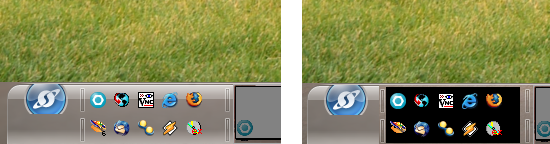
2) This might have something to do with the Virtual Desktop application - the transparent task-bar shows the background wallpaper from my main window even though I have set the VD to use it's own background as the window's background. Did that make sense? Here's a screen grab to give you an idea:

The left-most image is where you can see the wallpaper (the grassy image) stops just above the task-bar. Then my real background shows through the task-bar.
The right-most image shows what happens when I click to a different Virtual Desktop and then click back. the background of the Quick Launch area goes black. It happened in WB5.5 too, so I'm thinking it is related to VD not WB.