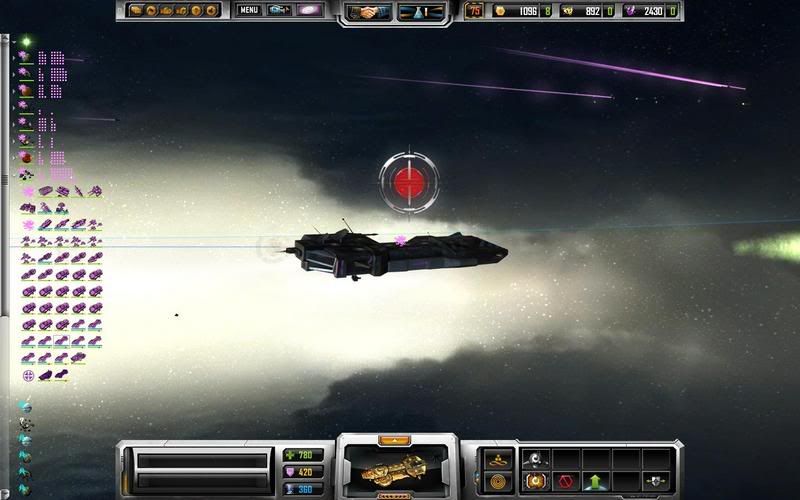
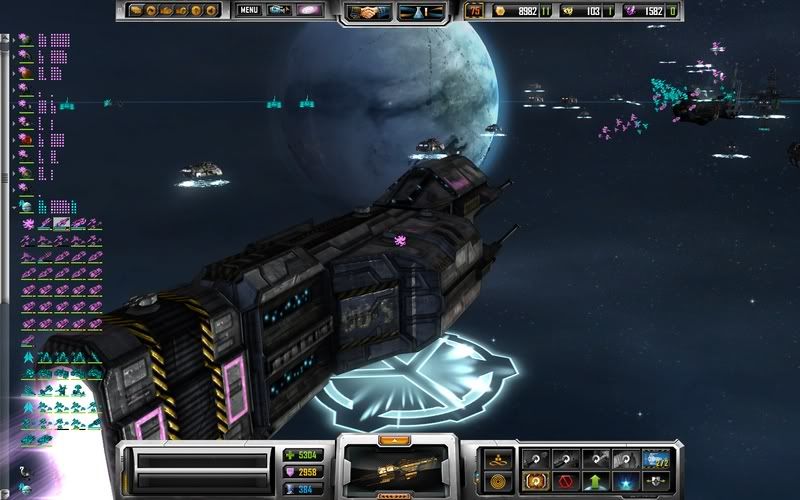
2 issues

I find the green directional arrows come up during battles if your cursor touches a ship.Shouldnt the directional arrows only show when you move a ship yourself not during auto move during a battle - it looks bad particularly on the Kol battlship.Consider making the arrows auto disable during combat.(the arrows look worse when zoomed in during combat and you happen to touch a ship with a cursor when moving around to enjoy the battle) they really destroy the visual experience.

The red floating globes over ships which appear after a research field - they look ridiculous , please consider removing them .


both of these issues effect the visual experience please consider these points.
10,623 views 25 replies
Reply #1 Top
The red floating globes over ships which appear after a research field - they look ridiculous , please consider removing them


the red globes are showing which ships have the target inhence given by the support cruiser


Reply #2 Top
Thats interesting i wasnt aware of that - but surely there may be some other way of signifying it - the red globes really do look ridiculous in battle. But is there really any need to signify those ships ?
Sorry it really does look strange - i thought they where some whizz bang forcefield
  
Reply #3 Top
i agree i was just telling you what was going on
Reply #4 Top
Yeah I agree with this, how about just adding a symbol in the ships information. You know the window that pops up when you scroll over it with your mouse.
Reply #5 Top
Or the orbs could simply be remade to add to the visual feel and that would be good for all concerned.
Reply #6 Top
I like the arrows. They let you know what the ship is doing. If its current plan is "jump to the next planet over by way of 3 hostile planets" or "attack that crystal extractor even though there are about 30 enemy ships the other direction" then I want to know about it.
Reply #7 Top

The red floating globes over ships which appear after a research field - they look ridiculous , please consider removing them .


Can you please provide a screenshot. Thanks
Reply #8 Top
I'm thinking he means these:

Reply #9 Top
I thought that icon indicates a ship is under the effect of an Akkan's targeting "aura".
Reply #10 Top
A draft manual would be a great help,avoid all the confusion we are getting.
Reply #11 Top
plz remove them in cinematic view

they can be in the way, when making screenshots..
Reply #12 Top

The red floating globes over ships which appear after a research field - they look ridiculous , please consider removing them .


Can you please provide a screenshot. Thanks


Seen here in this thread as well...on my line of cap ships:

https://forums.sinsofasolarempire.com/?forumid=408&aid=149628#1181619 (screenshot12)
Reply #13 Top
Akkan's targeting "aura".


what the heck is that ?
Reply #14 Top
Akkan's targeting "aura".


what the heck is that


the red globes are showing which ships have the target inhence given by the support cruiser


Reply #15 Top
ooooh ok!
Reply #16 Top
the red globes are showing which ships have the target inhence given by the support cruiser


ive seen 200+ ships with that orb, and its not pretty

Reply #17 Top
how long did it take to build that fleet?
Reply #18 Top
how long did it take to build that fleet?
Reply #19 Top

how long did it take to build that fleet?

Less then 4 hours i think, it was after the release of the beta i think. (gotta put my images in patch versions) The weird thing was, that it was stable, abit slow, but no problems though
Reply #20 Top
OK. Now I know I'm seriously ignorant on elevated fleet placement controls. I must have missed a tread somewhere on elevation controls. Can anyone point me to the right place?
Reply #21 Top
you mean, how to put them in formation?
then thats easy (after i was told how to do so) you see the green arrow? right click it till you see it says "all grouped"
Reply #22 Top
This is an example of how the red globes look ridiculous and detract from the visuals

Love the darker sky tho   


Reply #23 Top
indeed, a better location for active effects would be inside the unit icon (middle bottom).
Reply #24 Top

indeed, a better location for active effects would be inside the unit icon (middle bottom).


I agree 100%
Reply #25 Top
The best thing to do would be to make the showing of these icons(unit active effects) as an option in setup.

heres another example -