
Alienware and Stardock Corporation Partner to Deliver Xenomorph Desktop

Extra Alien-Goodness, Now Without The Probe!

http://www.alienware.com/intro_pages/invader.aspx
Alienware has teamed up with Stardock Corporation, the world’s leading desktop enhancement company, to create the new Xenomorph desktop theme. This theme allows Windows PC users to download and apply a slick new look to their desktop with just a few clicks.

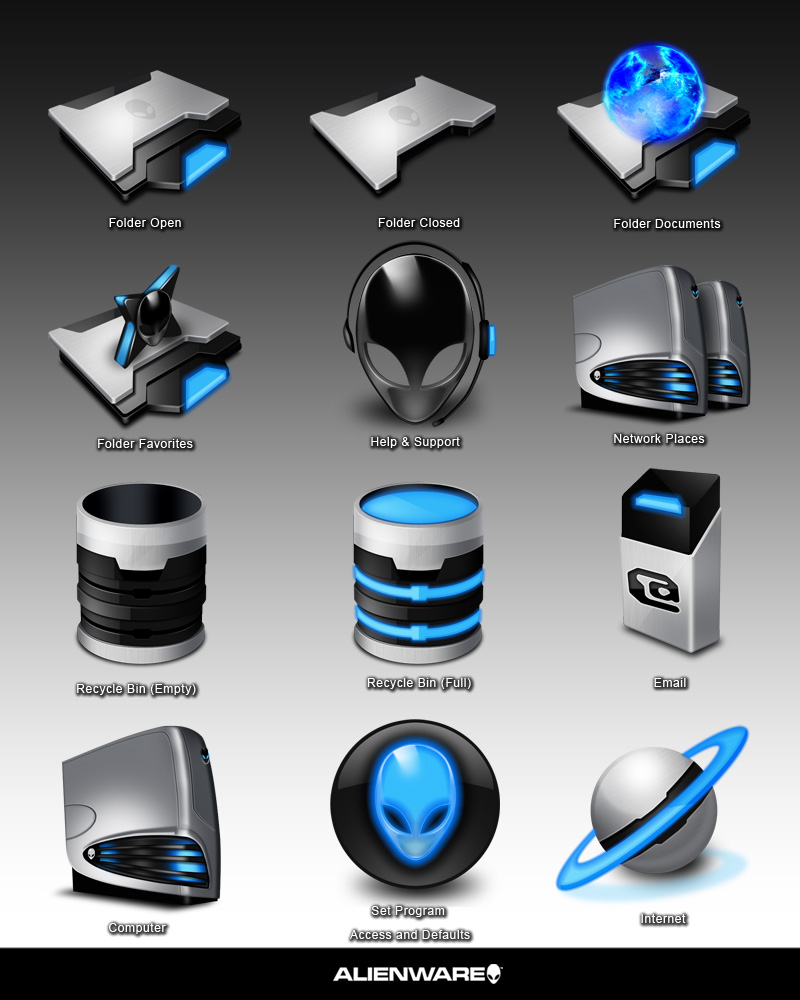
Created for Alienware by Stardock Design and powered by Stardock's Theme Manager software, this is the most complete theme ever created for an OEM partner. The Theme includes:

• WindowBlinds Visual Style
• Custom Icon Set
• Wallpaper
• Desktop Gadget RSS Reader (requires a separate download)
• ObjectDock OEM
• Installer and all software needed to transform your desktop.

Xenomorph, the most recent of many themes developed jointly, is available as a free download from the Alienware site at http://www.alienware.com/intro_pages/invader.aspx. Registration is required. This theme can be used by anyone, regardless of whether or not you own Stardock software.

Already own Stardock software? Then you can get the suite right here on WinCustomize:

Suite: https://www.wincustomize.com/ViewSkin.aspx?SID=1&SkinID=575&LibID=22
RSS Gadget: https://www.wincustomize.com/ViewSkin.aspx?SID=1&SkinID=926&LibID=34
 

77,290 views 40 replies
Reply #1 Top
Why don't they release it in separate parts, I can't use objectdock or the icons, they're not usable enough for me, but I'd like to give the skin a whirl.

*Actually, i take that back, you can just rename the suite to a .zip and dig out the windowblind - and it's gorgeous!
Reply #2 Top
Wonderful suite - thanks all who were involved in the making of this one!
Reply #4 Top
Awesome designs; however, it took F-O-R-E-V-E-R to download data from Alienware. I have broadband cable and downloaded Alienware data at 38 KB/sec???. Typically, I download at 2-3 MB/sec!! I'm surprised that Alienware has such a small download speed capability.
Reply #5 Top
Absolutely love the window and start menu animations, just stellar. The previous Alienware WindowBlinds were very "heavy" in style. This is really nice, much "lighter" with all the WB5 goodies. I have an Alienware laptop and it looks wonderful on it. I changed the wall to "Inovation" (available on alienware.com) - that combo goes really well also. Thank you to Alienware and to the skinners for sharing this one
Reply #6 Top
Its great, but the lack of WB5 per pixel frames bugs me.
Reply #7 Top
excellent collaboration
Reply #8 Top
So now that Alienware is Dell's bi... property, will you guys be providing similar packages to Dell's computers? That would really bring skinning to the masses.
Reply #9 Top
Between this and the GUI Champs, there is too much to choose from.
Reply #10 Top
i have just one issue with almost all Alienwire suites.., when u apply a suite it automaticaly change the user avatar; now, this time i cant even disable the option using WB setup(User Over..something)., the alien pick is ok., but is not my...

..other issue that i find out is that there are no toolbar icons! there are the defoult system icons.., look:


but well., the suite is good.., i give u 4 1/2 stars
Reply #11 Top
Well, I finally have the the suite even though I have WB 5 already loaded. I like this one the best by far. I just run a computer with Intel i865g graphics and it looks excellent at 1280x1024 on my dell 17in flat panel monitor. BTW.... I too noticed the slow 38kb download speed. Maybe its so popular that speeds are slowing to a crawl.
Reply #12 Top
Has anybody noticed that there's not one single "file type" in the Iconpack?

What's in the iconpack looks nice but it's not usable...for me!
Reply #14 Top
Has anybody noticed that there's not one single "file type" in the Iconpack?


I think, that most people, who are not so "deep" into skinning don't care much for "under the hood" skinning, so a nice desktop does it for them. For me personally I want to have suites most complete (which includes as much fitting icons and other skins as possible, even when I have to do some more myself). But hey, it's free.
Reply #15 Top
Well i love the skin but not the icons....

but still 5 stars from me great Windowblind.......
Reply #16 Top
Has anybody noticed that there's not one single "file type" in the Iconpack?


For me personally I want to have suites most complete (which includes as much fitting icons and other skins as possible, even when I have to do some more myself).


I agree with Carl on this one. I too noticed the IconPackager, but didn't really care because hey it's free. If you don't have "AlienMorph" or "Alienware Invader" I suggest d/l and using some of their file icons. Yangee's Alien 2006 is also a nice choice.
Reply #17 Top
Really nice WindowBlinds skin, but with a few head scratchers.

Why include the Windows Default toolbar icons as part of the skin? If you use the Toolbars setting "If the skin has a toolbar icon defined then use it, otherwise use the icon set selected below", you get the default icons, which ruins the look of the skin. Same with File Animations.....
Tweaked, and fixed!

Since this skin does not use per-pixel titlebars, why not replace the system titlebar icon with an alien head? Personal preference, I know..... but it looks so much better now.

Rollup set to 92 pixels?? That's just crazy!
I'm having a little trouble filling in the blank left bottom corner when set to a more reasonable 36 pixel rollup, but I'll eventually get that fixed too.
Reply #18 Top
I concur with Koasati. We are peasants, thank you for the bowl of rice.
Reply #19 Top
I concur with the previous comments re: Toolbar icons, otherwise a very nice looking WB skin. However, after using it for a little while I experienced programs freezes. At first, I thought it was just IE 6, but then another program froze. So, I rebooted thinking that would resolve the issue but no go. Changing skins and then back again also did not resolve the problem. Thus, unfortunately, I cannot use this skin. This is on a newly built system which is perfecto in every way and using WB 5.1 (latest beta build).
Reply #20 Top
after using it for a little while I experienced programs freezes.


i thought it was only me but it seems that not.., i also have that issue., i guess that the main problem is at the Theme Manager..., maybe not...
Reply #21 Top
i guess that the main problem is at the Theme Manager..., maybe not


Maybe not.... because I selectively extracted the contents of the WB skin folder, created a .wba file with them and installed it as a standalone skin via WindowBlinds configuration. For me, Theme Manager isn't an issue as it wasn't used. Too bad about this, eh?!
Reply #22 Top
i guess that the main problem is at the Theme Manager..., maybe not


Maybe not.... because I selectively extracted the contents of the WB skin folder, created a .wba file with them and installed it as a standalone skin via WindowBlinds configuration. For me, Theme Manager isn't an issue as it wasn't used. Too bad about this, eh?!


Not sure what is going on with your systems, because I have used this theme since it was available, with no problems at all.
I love this theme, thanks for sharing it.

...btw, who made it? Great Job
Reply #23 Top
Love this skin, with several notable exceptions it could be the best suite ever. There's the issue of the toolbar icons and also the lack of file transfer animations and no cursors. It's my feelling that a "suite" should include all aspects to be complete. OTher than the aforementioned discrepencies this is on fine looking skin. The really unfortunate part for me is that I cannot use it for the same reason as Citizen Hapkido,it locked my system up repeatedly. I also tried using it as a standalone for WB5 however this had no real effect. Haven't had this problem before with any other suite and as soon as I switch to another theme the problem is gone, so I know it's not a problem w\my system. I truly hope that someone finds a solution or a workaround for this issue as I would love to use this theme.
Reply #24 Top
Clear and easy to use dark-and-blue skin. Thanks!

I found that "The Preface" by dar0ckx http://www.guichamps.com/skins2006.asp?skinid=620 fits perfectly and is more complete than the included Icon-Package.
Reply #25 Top
I too noticed the IconPackager, but didn't really care because hey it's free.


This is what I needed to know.
Look at all the time I've wasted on doing full packs. Now all I have to do is about 20 or 30.
Hey, it's free right?