No space on computer

Hi, I don't know very much about computers, so I might be asking a stupid question.

It seems as though every time I delete something on my computer nothing really happens, I don't get more space. I've got 9.69 GB left out of 74.5.   

Thanks for any help.
3,207 views 24 replies
Reply #1 Top
depends on the size of what you are deleting.

try downloading/installing/running this.

if you use the 'issues' cleaner part, I suggest saying yes to making a backup
Reply #2 Top
You haven't really asked a question! I suppose you will either need to upgrade your current hard drive to a bigger one or get yourself an external hard drive. 9.69 Gb is not very much and there isn't anything you can do to change it short of deleting ALOT of your big programs or upgrading.
I have an external hard drive that is 200GB. That is the way I would (and did) go. It expands your storage space at the same time giving you an extra back up in case your internal drive goes down. Hope that helps.
Reply #3 Top
I have had only 5 gb's left for over a year - once a week i toss junk on disks and delete all my big files of graphics im done with. I think you need to delete at least 100 mbs of stuff before it will even make a dent. I usually delete 500mbs then defrag and it will show and increase of space returned. I also run the CC cleaner bichur mentioned - once a day.

Have you defragged at all?
Reply #4 Top
Thx for the replies. Yes, I've defragged and compressed files (forget what it's called) ..

Even though there's not very much space left the largest programs I've got on my computer are F.E.A.R. and Ghost Reacon (3000-4000MB).. They're aren't any other large programs besides "Windows Driver Package - MSN (usbccgp) USB which is 40.165 MB. It sounds kind'a important, so I guess I shouldn't delete that, eih?

Thanks for any help. I'm very happy.
Reply #5 Top
Is your recycle bin empty? How much space are you allocating?

If you are a ODNT subscriber you can use DriveScan to show you drive space. {Tell me again SD how this falls under the customization umbrella but ObjectDock and CursorXP doesn't )

Or if you want something much nicer looking (if not as functional) try SequioaView

Windows Driver Package - MSN (usbccgp) USB may have to do with Windows Live Phone interface. Are you using MSN beta software?
Reply #6 Top
I'm using MSN [messenger??] Beta but I've never used a some Phone interface-thing if that was the question.
Reply #7 Top
Start/ Accessories/ Disk Cleanup. Select drive C. (Under the 'Disk Cleanup' tab make sure top 3 options are checked) Click 'More Options' tab. Click System Restore 'Clean Up' button. On the prompt click 'Yes'. Click 'OK' and click 'Yes'. Now check your disk space.
Reply #9 Top
I have 660Gb of free space...
Reply #10 Top
My first hard drive was 40MB. I thought to myself . . I'll never fill this up.
Reply #11 Top
Munterizer: Windows
Reply #12 Top
He means click on your start button go to : - program files -accessories - system tools - disk clean up. Just follow his instructions at disk clean up.
Reply #13 Top
I have 660Gb of free space...


Show off
Reply #14 Top
Zubaz..... "My first hard drive was 40MB. I thought to myself . . I'll never fill this up".
Same here, a brand new 286, 1/2 meg video, Acer, 12" monitor, purchased 1990, $1400....what a deal!!
Reply #15 Top
When I follow the instructions you give me (start - programs - accessories - system tools) the only thing there is "Internet Explorer - No Add-ons" ..
Reply #16 Top
Sorry. Think I know what you're telling me now.. My computer is in Danish so I see what you mean. Thx I'll try.
Reply #17 Top
One more reason we should all learn Esperanto
Reply #18 Top
I have 660Gb of free space...


And you'd probably have a heck of a lot more if you were to delete all those centrefold pics from the Playboy site.

BTW, I have 356gb of free space and am finding it hard to fill, so before you go deleting them........
Reply #19 Top

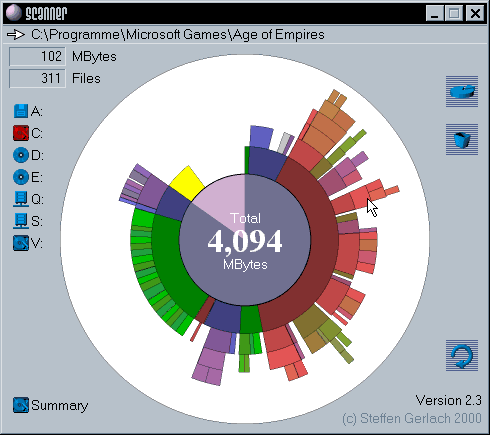
http://www.steffengerlach.de/freeware/ 

Download and run 'Scanner'.

It will give you a pie-chart of your drive[s]...and you can mouse-over each segment...or click on each for a more detailed view of folder size/use ....

Reply #21 Top

And you'd probably have a heck of a lot more if you were to delete all those centrefold pics from the Playboy site

4.5Gb - and all the girls are over 18   

Reply #22 Top
Munterizer,

yraq was referring to the disk cleanup functions (which can also be found by opening 'My Computer' > right-click your hard drive - usually "C:\" > select 'Properties').

Once you are in the Local Disk Properties dialog, you should see a "Disk Cleanup" button under the 'General' tab. Click that button to tell Windows to look for any files that can either be deleted or compressed to free up some space on the drive.

After Windows finds the information, another dialog box will appear with two tabs: (1) Disk Cleanup tab - which has check boxes for selecting the deletion or compression of files, and (2) More Options tab - which includes the 'System Restore' category with a "Clean up" button.

On the first tab (Disk Cleanup tab), yraq is telling you to make sure the top three options are selected, and then click 'OK' to perform the clean up.

You will then need to click the "Disk Cleanup" button again (found in the "Local Disk Properties" under the 'General' tab).

This time, when the dialog pops up, click the 'More Options' tab and then click the 'Clean up' button in the System Restore category. This will prompt Windows to delete all but the last System Restore point.

Note - System Restore is set by default to use up to 12 percent of your hard drive space to hold restore points. If you have been running your machine for a while, then it is possible that the full 12 percent is being used by System Restore which would prevent you from having more space for storage. If your system is running fine with the exception of a lack of space, then deleting all but the last System Restore point is safe and should give you some valuable space for saving files.

I hope this clarifies things a bit.
Reply #23 Top
4.5Gb -


WOW, 4.5 gigs worth!!!! That'd work out to how many centrefolds, 35 - 40 thou or so?

Obviously, then, you've been d/ling them from Penthouse, Hustler, Esquire, Parade, Mens Only and a few dozen others as well....simply because Playboy hasn't been going long enough for you to accumulate that many of theirs.

Oh well, with 660 free gigs, you have no data expansion worries.... lots o' room fer skins

Reply #24 Top
I have 9gb worth of Vista ISOs, two OSes installed, a files partition, and I still have a total of 41gb left of 80.

That's a lot more than I thought. o.o