
Gladiators Gladiators

Aston 1.9.2 released

Aston 1.9.2 released

Fast and beautiful Desktop replacement

http://www.astonshell.com/
Aston Shell is a Desktop replacement software, which saves your time and computer resources while giving your Desktop a unique look. Many Desktop enhancers just waste your resources. Unlike them Aston replaces your old Windows Desktop with a new one, which is faster, more beautiful and can be tuned to look and behave the way you like.
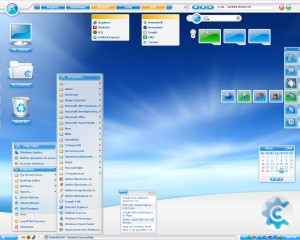
Aston

Key features:
* Fast, stable and highly responsive even on slow computers
* Easy customization of any Desktop parameter
* Hundreds of free Themes
* Lots of advanced features (hotkeys, Toolbars, freeform animated icons)

Download: Aston 1.9.2. Link: Aston website
26,290 views 39 replies
Reply #26 Top
No, no, this is exactly why I stressed what I wrote was not an attack on anyone. I wasn't refering to you specifically, as I have no reason to believe you didn't read the docs. It was just a general observation, my sincere apologies if you took it personally.

The fact is that there are *some* programs out there that require a bit of computer knowledge (some more, some less) to install and operate properly. A non-computer savvy user (and, again, I am definitely NOT referring to you) can get in trouble with these type of programs... it's not the user's fault either, it's just that 'you can't ask a baby to run before it can walk'.
Reply #27 Top

I believe that I should not have to edit the registry to un-install this and that programs like this should not require a geek degree.

Litestep used to spit out an error [well, it was actually Windows 98 doing it] if your Doze install was lacking a particular dll file.  The error was "you must re-install Windows".   Lord knows how many people actually DID that....but unfortunately "please locate and install mvcp60.dll and all will be OK" was NOT in Windows' vocabulary of helpful hints and FAQs.   It was, however, all over the place in the LS forums, etc.....along with the phrase 'RTFM'.

Because alternate shells is a fairly 'drastic' change to an OS's workings the idea of RTFM is paramount....and it wasn't until the latest rendition of Litestep-themeing [OTS2] that LS became even quasi geek-free...

Last time I used Aston it didn't appear to be a drama....[but that was some years ago]...

Reply #28 Top
Yep, I had the same problem. When I uninstalled I had no icons or start bar, which is actually the shell. You will need to edit the Registry nad add Explorer.exe back to where Aston inserts itself (assuming you are using WinXP) because Aston does a very poor job of uninstalling itself. And, this info. is NOT on the Aston website. It does have how to fix if you are running Win98/ME, but not XP. I have learned my lesson. Never again...

Yeah, it looked cool, but I could never use the start bar in Aston (I attributed it to probably some video driver somewhere-not wanting to blame Aston.

My opinion-it is NOT usable and definitely NOT ready for Prime Time. I was hoping that since it was version 1.92 it might be a GO.

If you are not comfortable editing your Registry, DON'T do it!
Reply #30 Top
The problem you people are having is that you cannot uninstall Aston (or any other shell for that matter) while you are using that shell. You must return to Explorer before you uninstall Aston.
Reply #31 Top
This is probably one of the main reasons why alternate shells (i.e.; programs that replace Explorer as the shell instead of enhancing the existing shell) are not for everybody.


Exactly! I looked at Aston Shell but wanted something to enhance/expand upon 'Explorer', rather than replace the shell with something I'm not savvy enough to use/repair (have read shell replacements can be tricky), which is why I purchased the Winstep Extreme package instead. However, Aston Shell looks good, so perhaps I'll look into it for my secondary OS when I become a little more savvy.
Reply #32 Top
Good choice! Winstep Xtream is a much better program anyway.
Reply #33 Top
Have not looked at this thread for a day or so, looks as if everyone is saying the same thing, either be prepared to edit your registy or don't install. Good advise, but somewhat after the fact for many. I'm fortunate in the sense that simply due to the industry I work in, 1. I have access to an entire team of extremely talented IT folks and 2. I know how to edit my registry when I have to. As indicated by several comments here, not everyone has those options or background experience.

That being said, I still believe that if you are a developer, and have made the decision to charge for your application then by all rights you have, crossed that line so to speak, and now have the reponsibility to insure that your doing everything possible to make certain that the really simple things like installing and uninstalling of your application are as painless as possible with the expectation of the most generic level of technical expertise possible. At the very least, a qualifer during the installation that indicates that editing the registry to remove the application will be necessary.

At the end of the day, I agree the best advise is what some have already stated, if you are uncomfortable with tinkering with system settings and registry values, then do not install this. I still think that's to bad because fundamentally this a great concept for a alternate shell and some really nice eye candy for your desktop. Maybe the developer is reading this thread and will address this in a future build. I hope so because I think unless that issue is addressed, the Aston folks are severly limiting their potential market. Just my 2 cents worth.

BTW, not to try and promote or up-sell anything but a really good application for those of us without extensive backgrounds in the inner workings of the system registry, Registry Mechanic by PC Tools is great at solving registry problems and compacting your registry. It does cost too though.. $30 I think but worth it if you are doing a lot of tinkering. I'm sure there are a myraid of applications like this out there but worth looking into.
Reply #34 Top
@ Gregory2001-I DID have it in Explorer, not Aston, when I uninstalled. It then did just as I described.

What Aston WANTS to do is remain on your system and WANTS you to use ShellSwapper to go back and forth between Aston and Explorer. I tried this as well. Man, what a slow down! Explorer slowed to a CRAWL. That's when I had had enough. It still does not uninstall cleanly when you want it to.
Reply #35 Top
I think you're overstating the case a bit...though dealing with Windoze can be frustrating at the best of times, much less when a shell replacement is misbehaving.

From the FAQ:
run %Aston%\Shswdos.exe at a command prompt.

Oleg & company have no desire to remain installed if they're not welcome...
Reply #36 Top
Not to make too fine a point of it, but I believe all that does is run ShellSwapper in DOS mode. At this point, I don't believe I has Shellswapper installed even though my Registry entries were still set running Aston Shell as the shell. And I really had a bad taste in my mouth about thsi experience with Aston. As stated before, when I had ShellSwapper installed, and chose to run Explorer, it made Explorer very slow. For instance, when I clicked the Start button, I had to wait for seconds...it was not instant as before.
Perhaps it does not play well with WB5??? I did not unload WB5 before running Aston...
Reply #39 Top
If you are using XP, use ShellSwapper and get back into Explorer as your shell. Use the Control Panel to uninstall Aston.
Then, more than likely your system will have no shell.
Don't panic. It will probably boot into a screen with only the mouse showing.
Start Task Manager (CTRL-ALT-DEL)
File/Run...
Regedit [Enter]

- To set the DEFAULT system shell:
     * Locate the following key:

     HKEY_LOCAL_MACHINE\Software\Microsoft\Windows NT\CurrentVersion\Winlogon
     * Change the string value named "Shell" to the location of the file you
       want to use as your default system shell.
              For Explorer use (do not specify a path):
         Explorer.exe